How I built the backend layer for an Oracle Agent Memory Workspace using FastAPI, Oracle Autonomous Database over TLS, OCI Generative AI, Codex, ChatGPT Enterprise and Visual Studio Code.
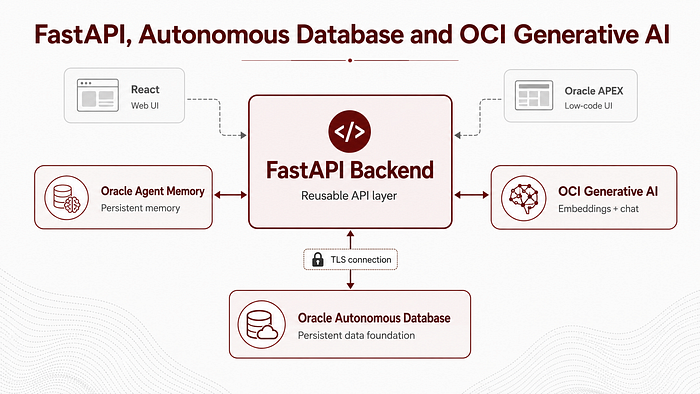
2.0 Introduction: from architecture to backend implementation
In the first article of this series, I explained the architecture behind my Oracle Agent Memory Workspace.
The idea was to move from a simple memory demo to a reusable workspace where AI agents can store, retrieve and reason over persistent context. I also explained how this work started from Harry Snart’s excellent article, “Exploring Oracle Agent Memory”, and how I extended the idea into a broader architecture with FastAPI, React, Oracle APEX, Oracle Autonomous Database and OCI Generative AI.
In this second part, I want to go deeper into the backend.
This is the layer that makes the whole workspace reusable.
The backend is responsible for connecting to Oracle Autonomous Database, initializing Oracle Agent Memory, configuring OCI Generative AI embeddings and chat models, exposing REST endpoints, protecting them with an API key, supporting model switching, and returning clean JSON responses that can be consumed by both React and Oracle APEX.
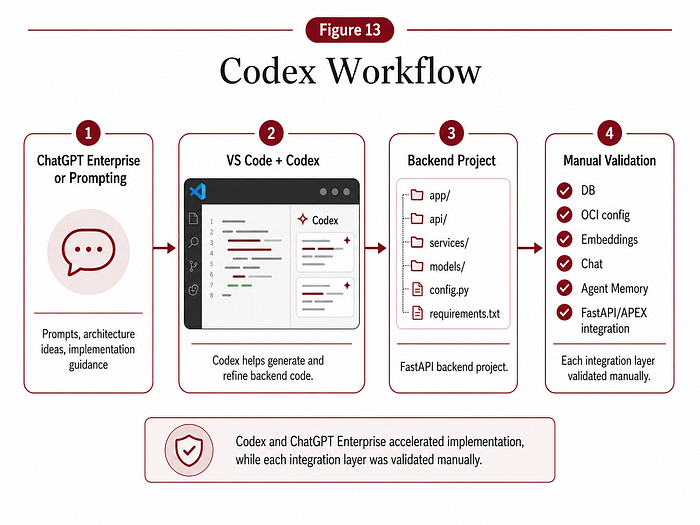
The backend is also where I spent a lot of time working with Codex, ChatGPT Enterprise and Visual Studio Code. The implementation was built iteratively: prompt, generate, test, debug, refactor and validate.
That workflow was critical. FastAPI made it easy to expose the functionality, but every layer had to be verified against the real environment.
- Database connection.
- OCI config.
- Embedding dimensions.
- Chat model initialization.
- Oracle Agent Memory smoke tests.
- REST payloads.
- APEX compatibility.
- GitHub hygiene.
This article documents that backend journey.
2.1 The role of the backend in the workspace
The backend is the central integration layer of the workspace.
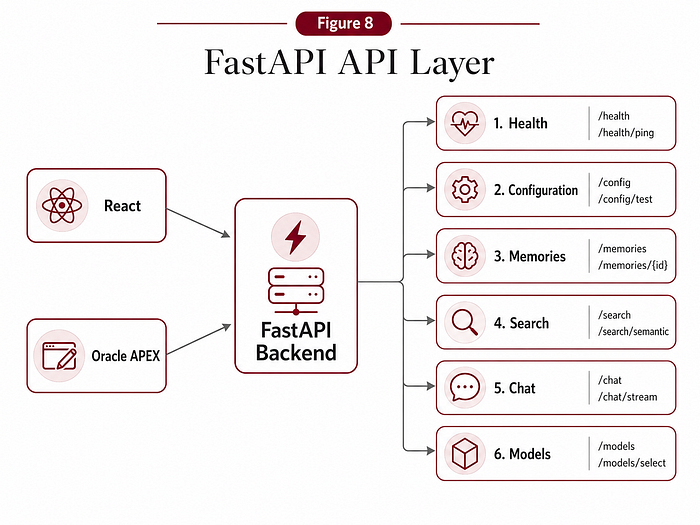
The React app and Oracle APEX app do not talk directly to Oracle Agent Memory. They call FastAPI.
FastAPI then handles the actual memory operations.
The backend is responsible for:
- Connecting to Oracle Autonomous Database.
- Initializing Oracle Agent Memory.
- Creating and searching memories.
- Calling OCI Generative AI for embeddings and chat.
- Managing the active chat model.
- Returning source memories used by chat responses.
- Providing database and model configuration information.
- Exposing clean REST endpoints for the frontends.
- Logging and returning useful errors.
This separation made the architecture much cleaner.
- React can focus on the user experience.
- APEX can focus on enterprise-style application delivery.
- FastAPI can focus on service orchestration.
- Oracle Agent Memory can focus on persistent memory.
- Autonomous Database can focus on storage, indexing and governance.
- OCI Generative AI can focus on embeddings and chat inference.
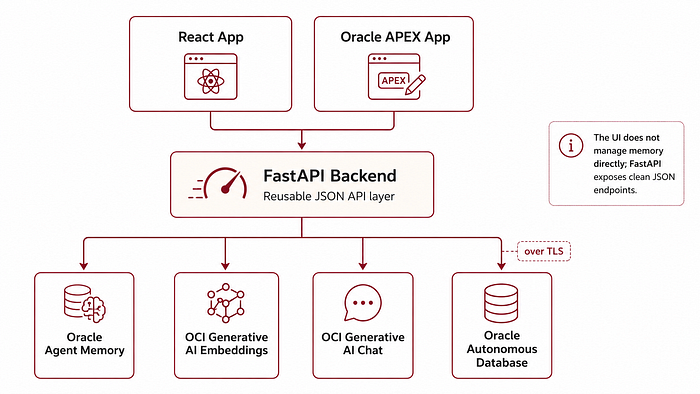
2.2 Project structure
The project is organized as a full workspace, not just a single script.
At a high level, the repository contains a backend, a React frontend, tests, helper scripts and runtime configuration files.
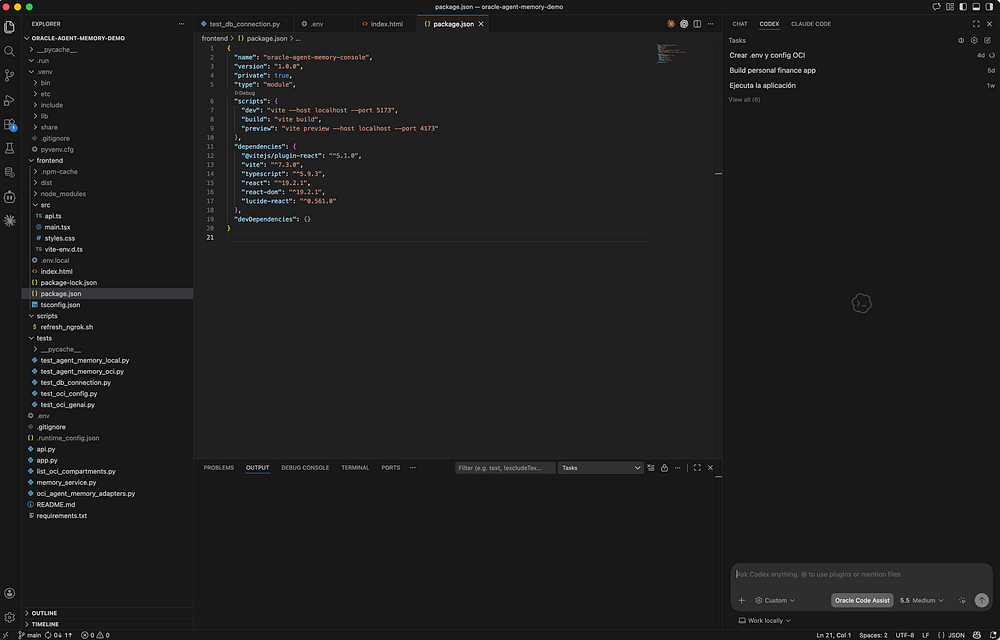
The important backend files are:
- api.py — the FastAPI application and REST endpoints.
- memory_service.py — the service layer that encapsulates Oracle Agent Memory, OCI Generative AI and database configuration.
tests/ — scripts used to validate database, OCI and Agent Memory behavior. - scripts/refresh_ngrok.sh — helper script to expose the local backend to Oracle APEX during development.
- .env — local backend configuration, ignored by Git.
- .runtime_config.json — runtime model configuration, also ignored by Git.
The frontend lives in a separate frontend folder, but the backend is the foundation.
One of the best decisions was to keep backend logic out of the UI. The frontends do not need to know how to create an OracleAgentMemory client. They only need to call endpoints such as /memories, /search, /chat and /models.
This is what made the same backend usable from both React and Oracle APEX.
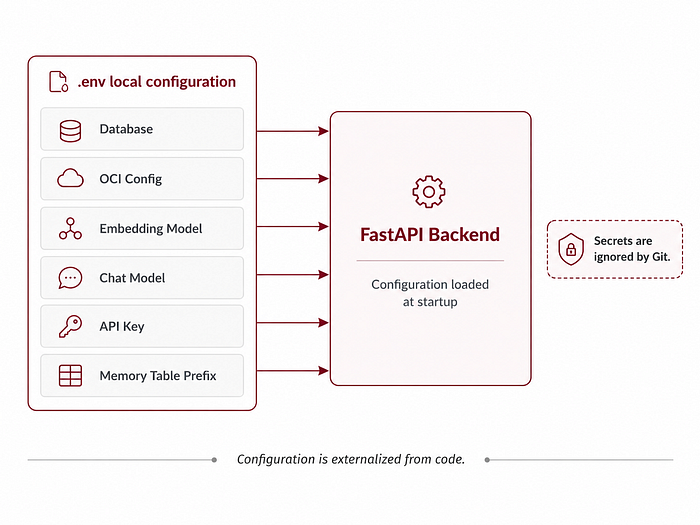
2.3 Environment configuration
The backend is configured through environment variables.
The .env file contains the database connection, OCI configuration, model configuration and API key.
The most important values are:
DB_USER
DB_PASSWORD
CONNECT_STRING
OCI_CONFIG_FILE
OCI_COMPARTMENT_ID
OCI_GENAI_ENDPOINT
OCI_EMBED_MODEL_ID
OCI_EMBED_DIMENSIONS
OCI_CHAT_MODEL_ID
OCI_CHAT_PROVIDER
AGENT_MEMORY_API_KEY
MEMORY_TABLE_PREFIX
The database connection uses Oracle Autonomous Database over TLS without wallet. The connect string uses TCPS on port 1522 and points to the high service of the Autonomous Database.
The embedding configuration uses cohere.embed-english-v3.0 with 1024 dimensions.
The chat configuration supports multiple OCI Generative AI Cohere models, including Command A, Command R, Command R+ and latest aliases.
The API key protects the backend when it is consumed from React or APEX.
I kept all sensitive configuration out of Git. The .env file is ignored, together with runtime files, virtual environments and frontend build artifacts.
This is one of the first areas where Codex was useful, but also where manual validation was important. It is easy to generate a configuration loader. It is more important to validate that every variable is actually present, correctly parsed and safe to use.
2.4 Connecting to Oracle Autonomous Database over TLS
The backend connects to Oracle Autonomous Database using TLS without wallet.
This was one of the first things I validated because everything else depends on it.
The connection uses the Oracle Python driver and a TCPS connect string pointing to Autonomous Database. In my case, the host was in the Frankfurt region and the connection used port 1522 with the high service.
The validation was simple: create the connection, run a basic query and confirm that the database responds.
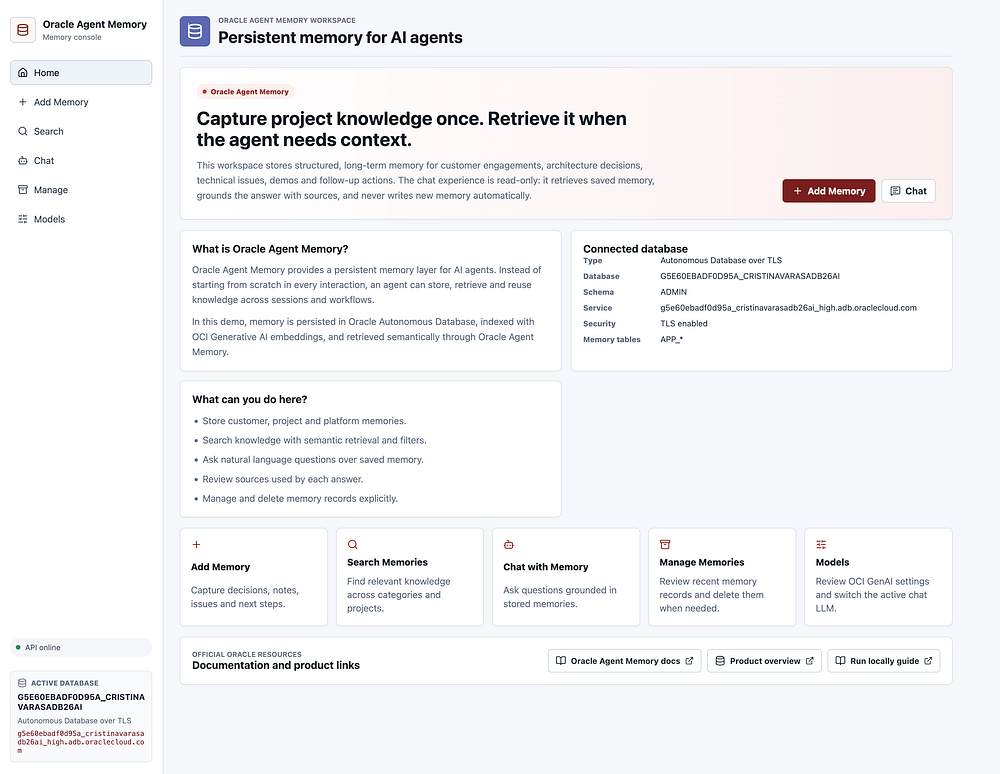
Once the connection worked, I added a backend endpoint called /config/database.
That endpoint returns useful information about the active database connection, including:
- Database user.
- Connection type.
- Host.
- Port.
- Service name.
- Current schema.
- Database service.
- TLS status.
- Memory table prefix.
- Any connection check error.
This became useful for both React and APEX because I could show the active database directly in the UI. When developing with a local backend, ngrok, React and APEX, it is very easy to lose track of what is connected to what. A visible database card solves that.
2.5 OCI config and why plain text matters
The backend also needs OCI configuration to call OCI Generative AI.
One small but important lesson: the OCI SDK expects a plain text config file.
In my case, the original file was in rich text format, so I converted it into a clean plain text config file before using it with the OCI SDK.
The config file is used to load OCI user, tenancy, region, fingerprint, key file and compartment information. From there, the backend can initialize the embedding and chat model clients.
This was one of the early validation steps:
- Load OCI config.
- Check compartment.
- Initialize embedding model.
- Generate a test embedding.
- Check embedding dimensions.
- Initialize chat model.
- Send a simple test prompt.
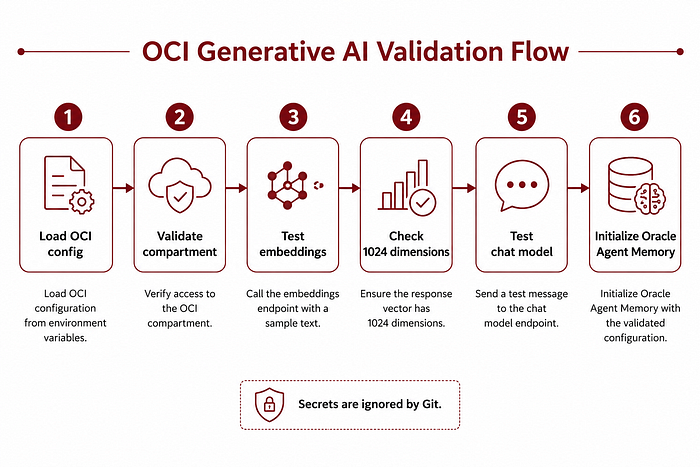
The embedding test was especially important because Oracle Agent Memory needs embeddings with the expected dimensionality. In this project, the embedding model returns 1024 dimensions.
2.6 Embeddings with OCI Generative AI
Embeddings are what make semantic search possible.
For this workspace, I used cohere.embed-english-v3.0 through OCI Generative AI.
The embedding dimensionality is 1024.
This matters because the memory store needs to index and retrieve content consistently. If the embedding dimensions are wrong or the embedding model is not initialized correctly, memory search will not work reliably.
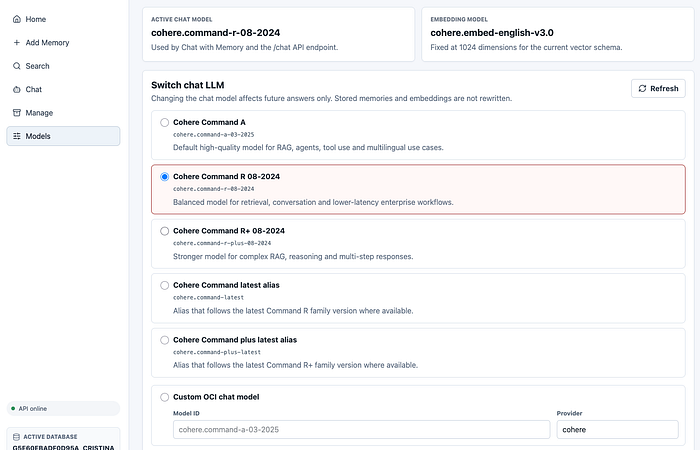
The backend exposes the embedding configuration through the /models endpoint, so the UI can show:
- Embedding model.
- Embedding dimensions.
This is displayed in the Models page and helps make the system more transparent.
The user does not have to guess what model is being used. The application shows it.
2.7 Chat models and runtime model switching
For chat, the backend supports multiple Cohere models through OCI Generative AI.
The supported options include:
- cohere.command-a-03–2025
- cohere.command-r-08–2024
- cohere.command-r-plus-08–2024
- cohere.command-latest
- cohere.command-plus-latest
One useful feature was adding a Models endpoint that returns the active chat model, active provider, embedding model, embedding dimensions and available chat model options.
The Models page can then:
- Show the active model.
- Test a selected model.
- Save a selected model as active.
The active model is stored in a runtime configuration file. This file is ignored by Git because it represents local runtime state, not source code.
This was also one of the places where I hit a very practical bug.
In APEX, a select list was initially sending a value like model_id;model_id instead of just model_id. OCI Generative AI then returned a model-not-found error because it was receiving the wrong string.
The fix was simple: make sure the LOV return value was only the model ID.
That is a good example of the kind of integration issue that appears when connecting backend APIs to APEX UI components. The backend was fine. OCI was fine. The problem was the value being submitted by the UI.
2.8 Initializing Oracle Agent Memory
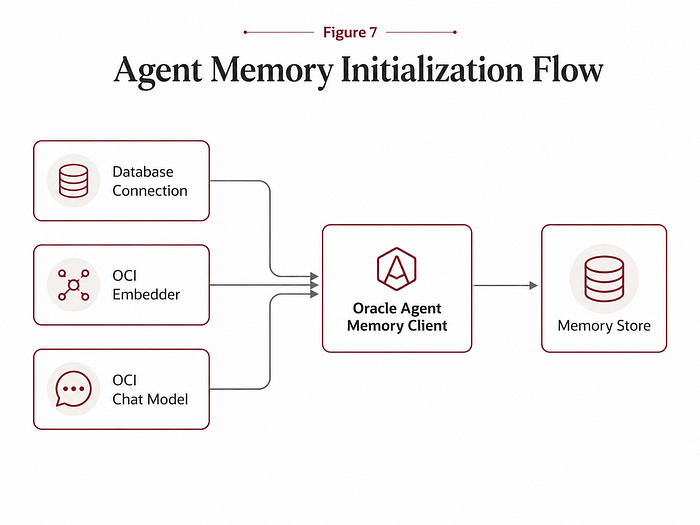
Once database and OCI configuration were validated, the next step was initializing Oracle Agent Memory.
The memory client needs:
- A database connection.
- An embedder.
- A chat LLM.
- A schema policy.
- A table name prefix.
For early development, I used a schema policy that allows the memory store to create the required database objects if they do not already exist.
That is important during first setup. The database user needs privileges to create the required objects and vector indexes. After initial setup, the policy can be made stricter if needed.
I also used a memory table prefix so the memory objects are clearly identifiable.
The smoke test was simple: initialize Oracle Agent Memory, add or search memory, and confirm that the full loop works.
Only after that did I start exposing the functionality through FastAPI.
Do not start with the UI. Start with the connection:
– Then validate OCI.
– Then validate Agent Memory.
– Then expose endpoints.
– Then build the UI.
That approach saved a lot of debugging time.
2.9 The service layer: memory_service.py
The most important backend file is memory_service.py.
This file encapsulates the core business logic of the backend. Instead of putting all logic directly inside FastAPI route handlers, I separated the service functions. The service layer handles:
- Creating the database connection.
- Initializing the Oracle Agent Memory client.
- Adding memories.
- Searching memories.
- Listing memories.
- Deleting memories.
- Chatting with memory.
- Getting model configuration.
- Saving the active chat model.
- Testing a chat model.
- Returning database configuration.
This made the backend much easier to maintain.
- FastAPI routes can stay clean.
- React and APEX can receive clean JSON.
- The memory logic is centralized.
- Model management is centralized.
- Database configuration is centralized.
It also made Codex-assisted development more effective. I could ask Codex to refactor specific service functions without mixing them with UI code or APEX-specific behavior.
2.10 The API layer: api.py
The api.py file exposes the REST API. The most important endpoints are:
- GET /health
- GET /health/deep
- GET /config/categories
- GET /config/database
- GET /models
- POST /models/chat
- POST /models/chat/test
- POST /memories
- GET /memories
- POST /search
- POST /chat
- DELETE /memories/{memory_id}
The API is designed to return clean JSON responses that are easy to consume from both React and Oracle APEX. For example:
- The Add Memory page calls
/memories. - The Search page calls
/search. - The Chat page calls
/chat. - The Manage page calls
/memoriesandDELETE /memories/{memory_id}. - The Models page calls
/models,/models/chat/testand/models/chat. - The APEX Home page calls
/healthand/config/database.
This is where the decision to use FastAPI really paid off.
- One backend.
- Multiple frontends.
- Consistent API.
- Clear JSON.
2.11 Memory creation
Memory creation is explicit. The backend accepts a structured payload with title, content, category, customer project, tags and source. This maps well to the way I wanted the workspace to behave. A memory should not just be text. It should have enough metadata to be useful later.
- The categories make filtering easier.
- The customer project groups related context.
- The tags allow additional classification.
- The source helps trace where the memory came from.
- The title makes search results readable.
- The content contains the actual knowledge.
This endpoint is used by both React and APEX.
One important principle: the chat does not call the memory creation endpoint automatically. Only the Add Memory flow creates new memory.
2.12 Semantic search
The search endpoint is one of the core capabilities of the workspace. It accepts a query and optional filters such as category, customer project, tags and limit. The backend retrieves relevant memories and returns them as structured JSON. The response includes the number of results and an array of memories, each with its metadata and content.
This is useful even without an LLM.
Sometimes the user does not want a generated answer. Sometimes they just want to find relevant memories. That is why Search is a first-class page in both React and APEX.
It also became useful for Project 360, where memories for a selected project can be loaded and displayed before generating a higher-level summary.
2.13 Chat with memory
The chat endpoint is where everything comes together. The user sends a question, optionally filtered by project or category. The backend retrieves relevant memories, builds context, calls the active OCI Generative AI chat model and returns an answer with the memories used as sources. The response includes:
- The generated answer.
- The used memories.
- Memory IDs.
- Titles.
- Categories.
- Projects.
- Source.
- Creation date.
- Score.
- Content preview.
- Full content where available.
This is essential for trust. If the assistant gives an answer, the user should be able to inspect what memory was used to produce it. This is also why the React and APEX chat interfaces both include a sources panel.
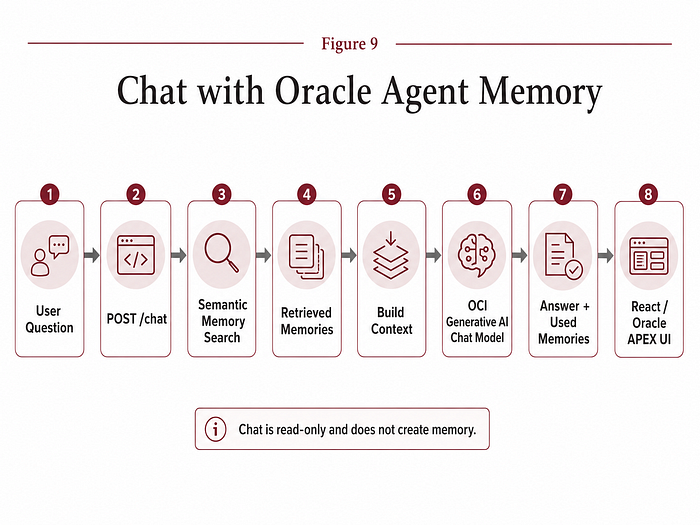
The goal is not just to answer. The goal is to answer with traceability.
2.14 Model management endpoints
Model management became more useful than I expected. The backend exposes endpoints to get the active model configuration, test a selected chat model and save a selected model as active. This allows the UI to show the current runtime configuration and test alternative models without changing code.
That was especially useful during development because different models can behave differently depending on the prompt and retrieval context. For example, project summaries, technical explanations and customer tracking notes may benefit from different model behavior.
The Models page made this experimentation visible and controlled.
It also helped confirm that the backend was really using the model selected by the user.
2.15 Error handling
The backend returns errors in a consistent JSON format. This was important because APEX needs predictable error responses. A typical error contains an error field and a detail field.
For example, if the API key is missing, the backend returns an unauthorized error explaining that the X-API-Key header is missing or invalid. If a model cannot be initialized, the backend returns a service unavailable response with details from OCI. If a category is unsupported, the backend returns a clear validation error. This helped a lot during APEX integration.
Instead of guessing what went wrong, I could inspect the response body in the APEX API log table and see exactly what the backend returned.
2.16 Protecting the backend with X-API-Key
The backend uses a simple API key mechanism. Every request from React or APEX includes the X-API-Key header. The API key is stored in the backend .env file and in the frontend or APEX configuration. For local development and controlled demos, this approach is lightweight and effective.
However, it is not the final production security architecture.
For production, I would move to OCI API Gateway, OCI Vault and stronger authentication patterns. In APEX, I would also move away from hardcoded API keys in PL/SQL and use Web Credentials or a more secure secret management approach.
Still, for building and validating the workspace, the API key was a practical starting point.
2.17 Testing strategy
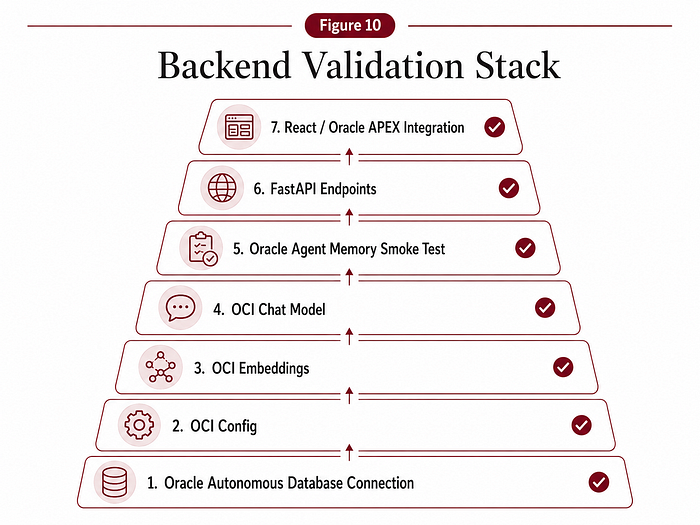
I created several tests to validate each layer before relying on the full application.
The tests covered:
- Database connection.
- OCI config loading.
- OCI Generative AI embeddings.
- Embedding dimensions.
- OCI Generative AI chat.
- Oracle Agent Memory smoke test.
- Full Oracle DB + OCI GenAI + Agent Memory integration.
This was important because failures can happen at many levels.
- The database connection might fail.
- The OCI config might point to the wrong file.
- The compartment might be wrong.
- The embedding model might not be available.
- The chat model might not initialize.
- The memory schema might not exist.
- The API key might be missing.
By testing each layer separately, debugging became much easier.
2.18 Exposing the backend to APEX with ngrok
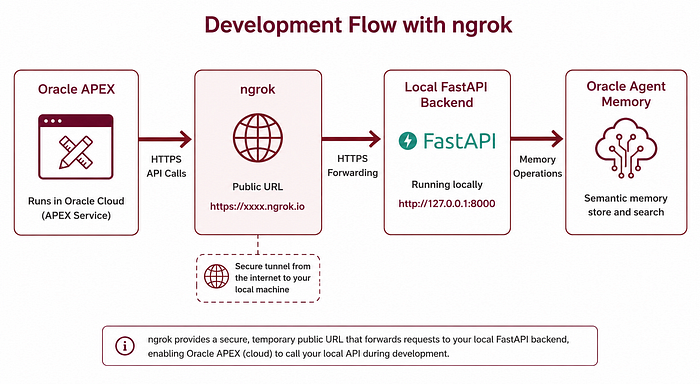
During local development, the backend runs at http://localhost:8000.
The React app can call that directly. Oracle APEX cannot.
Because APEX runs in the cloud, it needs a public URL to reach the backend. For development, I used ngrok to expose the local FastAPI server. This creates a public URL that forwards requests to the local backend.
APEX then stores that URL in a global application item and uses it for REST calls. The limitation is that free ngrok URLs are temporary. When the tunnel stops or changes, the APEX configuration must be refreshed.
To make this easier, I created a helper script called scripts/refresh_ngrok.sh. The script checks whether FastAPI is alive, starts it if needed, starts or reuses ngrok, reads the public URL, tests the health endpoint and prints the PL/SQL block needed to update APEX.
This small automation made the development loop much smoother.
2.19 Building with Codex, ChatGPT Enterprise and Visual Studio Code
A large part of this backend was built with Codex, ChatGPT Enterprise and Visual Studio Code.
This was not a one-shot prompt. It was an iterative workflow.
I used prompts to define the expected behavior of the backend, generate FastAPI endpoints, refactor the service layer, improve model management, create tests, prepare API responses for APEX, debug payload issues and improve repository hygiene.
But every generated piece had to be validated. That is the key point.
AI-assisted development is powerful, but it does not remove the need for technical ownership.
In this project, Codex helped me move faster, but I still had to decide the architecture, validate the database connection, check OCI configuration, test embedding dimensions, inspect model errors, verify API responses, debug APEX session state and ensure that secrets were not committed to Git.
This is where I think vibe coding becomes useful in enterprise contexts. Not as blind generation. But as accelerated implementation with disciplined validation.
The workflow was:
- Define the target behavior.
- Prompt Codex inside Visual Studio Code.
- Generate or refactor code.
- Run the backend.
- Test the endpoint.
- Inspect the response.
- Fix issues.
- Commit to GitHub.
- Repeat.
That loop made the project progress quickly without losing control of the architecture.
2.20 Lessons learned from the backend
A few lessons stood out while building the backend.
First, validate the foundation before building the UI. If the database connection, OCI config or Agent Memory initialization is not stable, the frontend will only make debugging harder.
Second, expose clean JSON. This made it possible to reuse the backend from both React and APEX.
Third, make sources visible. A memory-aware assistant should not just answer. It should show which memories were used.
Fourth, keep memory creation explicit. The chat should retrieve memory, not automatically write memory. This helps avoid polluting the memory store.
Fifth, model management matters. Being able to test and switch models from the UI made development easier and made the system more transparent.
Sixth, AI-assisted development works best when paired with validation.
Codex helped accelerate implementation, but testing each layer was what made the project reliable.
2.21 What I would improve next
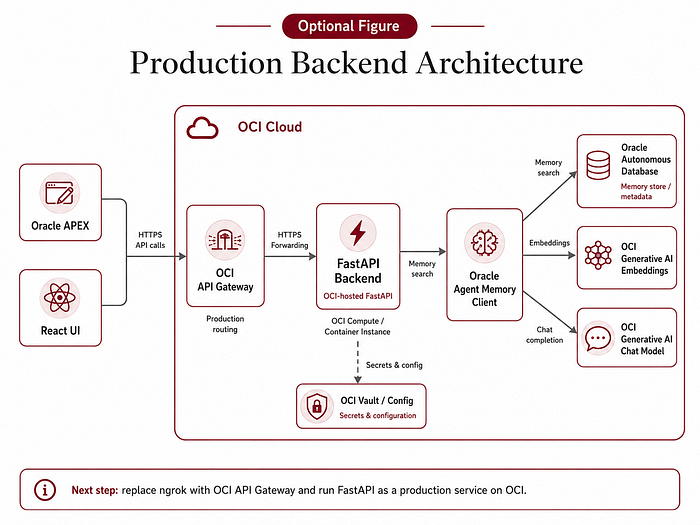
The current backend is good for local development and demos, but the next step would be deployment on OCI.
The target architecture would replace ngrok with OCI API Gateway and run the FastAPI backend on OCI, for example using Compute, Container Instances or another suitable deployment option.
Secrets should move to OCI Vault.
APEX should use Web Credentials or a stronger secret management approach.
API calls should have richer audit logging.
The backend could also support multiple workspaces, multiple database targets and persistent chat sessions. That would move the project from a local workspace to a more production-ready enterprise architecture.
2.24 Final thoughts
The backend is what turned this project from an experiment into a reusable workspace.
- Oracle Agent Memory provides the persistent memory layer.
- Oracle Autonomous Database provides the database foundation.
- OCI Generative AI provides embeddings and chat inference.
- FastAPI connects everything.
- React and Oracle APEX consume the same API.
This separation made the project flexible enough to evolve.
It also made the development process more interesting. With Codex, ChatGPT Enterprise and Visual Studio Code, I could move quickly from architecture to implementation, but every layer still required validation.
That combination — AI-assisted development plus disciplined testing — is what made the workspace work.
In the next article, I will focus on the Oracle APEX side: how I connected APEX to the FastAPI backend, created global API configuration, built Add Memory and Search pages, implemented a ChatGPT-style Chat Workspace, added Models and Project 360, and used APEX collections to manage conversational state and source memories.
Next in the series: Building an Oracle Agent Memory Workspace — Part 3/3: Bringing Persistent Agent Memory into Oracle APEX.
And as always, if you are interested in Oracle, AI, Data Science, APEX, Autonomous Database and real enterprise AI demos, follow me here on Medium / LinkedIn to keep learning with me 🙂