How I extended an Oracle Agent Memory exploration into a working workspace with FastAPI, React, Oracle APEX, Autonomous Database, OCI Generative AI, Codex, ChatGPT Enterprise and Visual Studio Code.
1.0 Introduction
AI agents are quickly moving beyond simple chat interfaces.
They can call tools, reason over documents, generate code, interact with APIs, orchestrate workflows and support increasingly complex enterprise tasks. But there is one capability that changes the way we should think about them:
memory.
Without memory, an agent is useful but limited. It can answer a question, summarize a document or execute a task, but every new session starts almost from zero. The user has to repeat the same context again and again. The agent cannot reliably remember project decisions, customer constraints, previous issues, architecture choices or follow-up actions.
For short conversations, this may be acceptable.
For real work, it is not.
That is why I wanted to explore Oracle Agent Memory and build something practical around it: not just a notebook, not just a demo script, but a workspace where persistent memory becomes part of the application experience.
This article is the first part of a three-part series where I will document how I built an Oracle Agent Memory Workspace using Oracle Autonomous Database, Oracle Agent Memory, OCI Generative AI, FastAPI, React/Vite, Oracle APEX, ngrok, GitHub, Codex, ChatGPT Enterprise and Visual Studio Code.
The final result is a working application that can create memories, search them semantically, chat over them, inspect sources, manage models and expose the same backend to both a React frontend and an Oracle APEX application.
This is not only a series about Oracle Agent Memory. It is also a series about how I used AI-assisted development to move from idea to working software: prompting, generating, testing, debugging and refining each layer until the architecture became real.
1.1 Credit where it is due: the article that started it
This project started after reading Harry Snart’s article, “Exploring Oracle Agent Memory”, published in the Data Science Collective.
Harry’s article does a great job introducing the concept of agentic memory and showing how Oracle Agent Memory can be used as a persistent memory layer for AI agents. His example focuses on a practical engagement tracker assistant, using Oracle Autonomous Database, OCI Generative AI and Oracle Agent Memory to store and retrieve useful context across interactions.
You can read Harry’s original article here:
Exploring Oracle Agent Memory
What I particularly liked about his approach was that it was not framed as “just another RAG demo”.
It was about something more operational:
- How can an AI assistant remember useful context?
- How can it retrieve previous notes?
- How can it help with ongoing engagements?
- How can it avoid starting from scratch every time?
That resonated with me immediately.
In customer-facing and technical roles, context switching is constant. One week you may be working on a forecasting use case, the next one on vector search, the next one on Oracle APEX, and then you return to a project where you need to remember decisions, blockers, architecture details and next steps.
That is exactly the kind of scenario where memory becomes valuable.
1.2 What I wanted to build
The objective was to create a practical memory workspace for AI-assisted project work.
I wanted an application where I could create structured memories, categorize them by project and type, search them semantically, ask questions grounded on stored memory, inspect which memories were used as sources, manage and delete obsolete memories, test and switch OCI Generative AI chat models, and expose the same backend to Oracle APEX.
In other words, I wanted to move from “here is a script that stores and retrieves memory” to “here is a reusable memory backend with multiple user interfaces”.
The workspace currently exists in two forms.
- First, a professional local React/Vite application.
- Second, an Oracle APEX application consuming the same FastAPI backend.
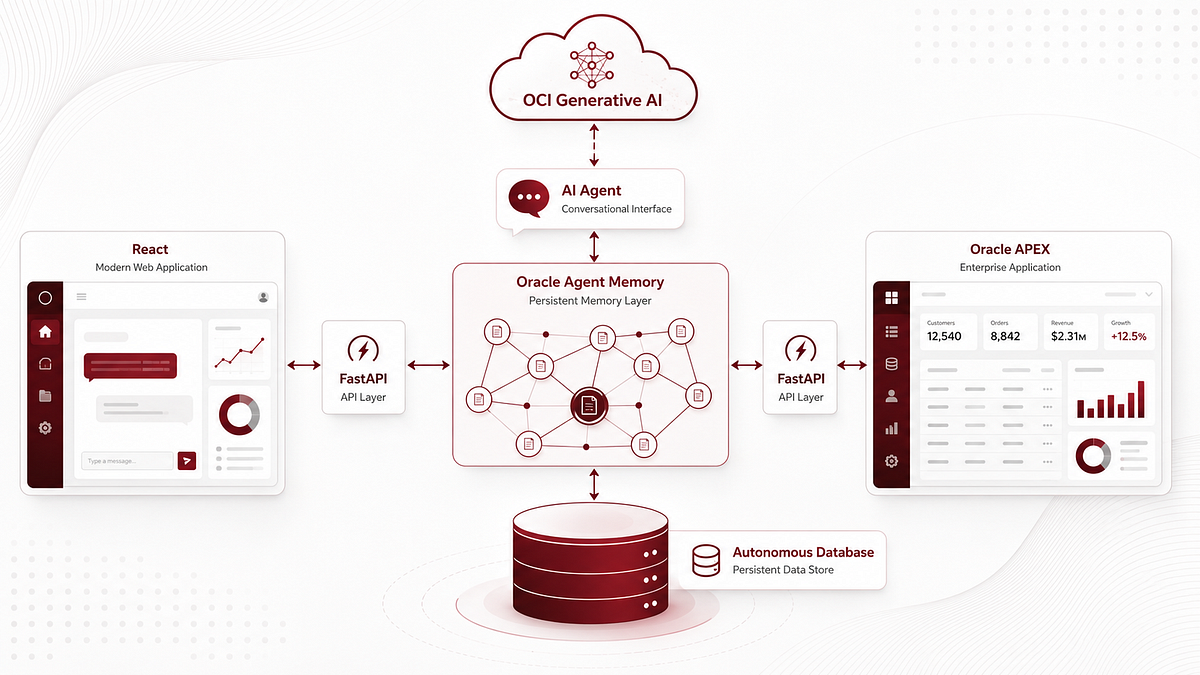
Both frontends talk to the same API. The API talks to Oracle Agent Memory. Oracle Agent Memory persists and retrieves memory from Oracle Autonomous Database, while OCI Generative AI provides embeddings and chat model inference.
This separation became one of the most important design choices in the project.
- React could focus on user experience.
- APEX could focus on enterprise-style application delivery.
- FastAPI could centralize the memory logic.
- Oracle Agent Memory could handle persistent memory.
- Autonomous Database could provide the underlying database foundation.
- OCI Generative AI could provide embeddings and chat inference.
1.3 One important design decision: chat is read-only
Before going deeper into the architecture, one design decision is worth highlighting.
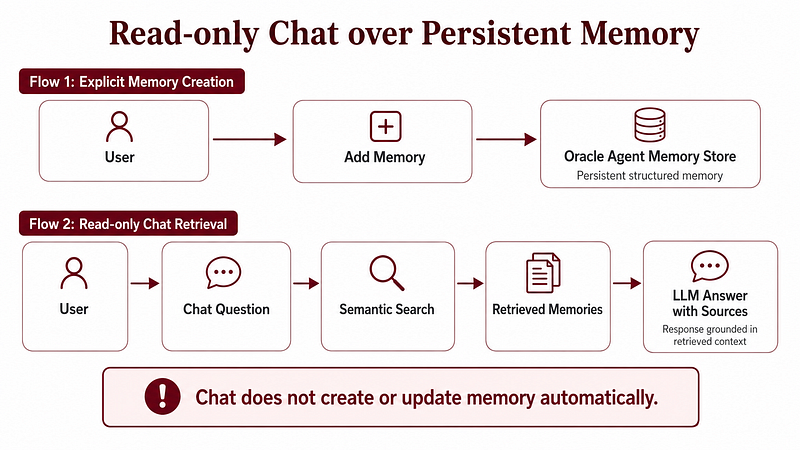
In this workspace, the chat does not write memory automatically.
The assistant can retrieve stored memories, use them as context, and answer questions based on them. But it does not create or update memories by itself.
New memories are only created explicitly from the Add Memory flow.
This is intentional.
If an agent can write memory automatically after every interaction, it can easily pollute the memory store with incomplete information, assumptions or even hallucinations. Harry also mentioned an important learning in his article: giving the agent too much flexibility to update memory can reinforce incorrect behavior.
So I wanted a safer pattern.
- Memory creation is explicit.
- Memory retrieval is conversational.
- Memory management is controlled.
That makes the system easier to trust, especially in enterprise-style workflows.
1.4 The high-level architecture
The architecture has three main layers: frontend, API, and memory/AI.
At a high level, the user can interact either with the React app or the Oracle APEX app. Both interfaces call the FastAPI backend. The backend initializes and uses Oracle Agent Memory, OCI Generative AI embeddings and OCI Generative AI chat models. Oracle Agent Memory persists and retrieves memories from Oracle Autonomous Database.
During development, the React app calls FastAPI locally. Oracle APEX calls the same backend through a temporary ngrok URL, because APEX cannot directly call a backend running on my local machine.
The current development architecture looks like this:
User → React App at localhost:5173 → FastAPI Backend at localhost:8000 → Oracle Agent Memory → Oracle Autonomous Database → OCI Generative AI.
And for APEX:
User → Oracle APEX → ngrok public URL → FastAPI Backend → Oracle Agent Memory → Oracle Autonomous Database → OCI Generative AI.
The backend is the central piece.
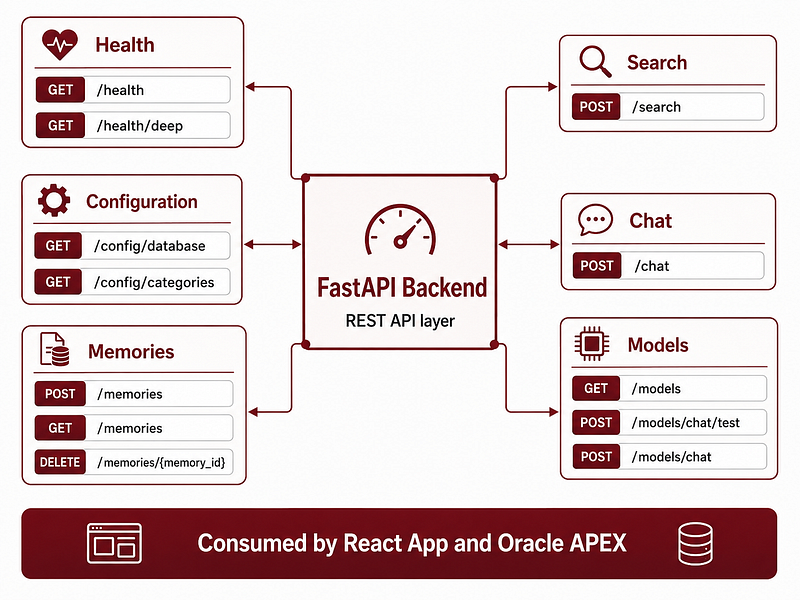
It exposes clean REST endpoints for health checks, database configuration, category configuration, memory creation, memory listing, semantic search, chat over memory, model testing, model switching and memory deletion.
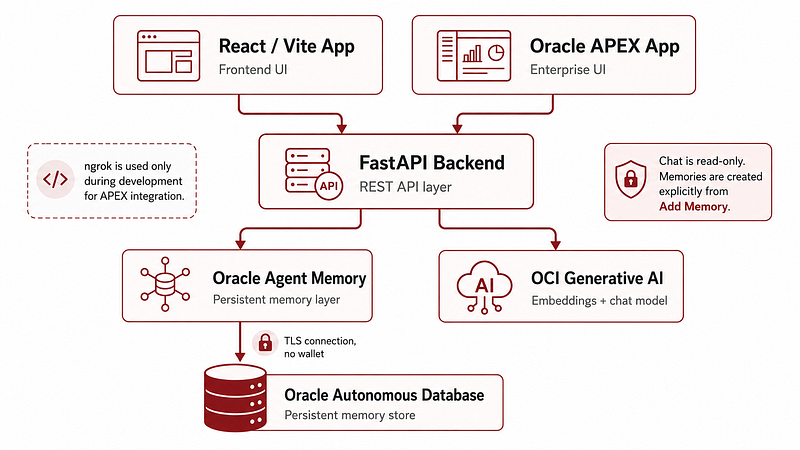
This gave me flexibility. I could build a React frontend first, then consume the same backend from Oracle APEX without duplicating the memory logic.
1.5 Why use FastAPI between the UI and Agent Memory?
Technically, I could have built a single local app that talks directly to Oracle Agent Memory.
But I wanted a cleaner separation.
React should not need to know how Oracle Agent Memory is initialized.
APEX should not need to know how OCI Generative AI is configured.
The UI should not directly manage the memory client.
The backend should expose simple JSON endpoints.
FastAPI became the integration layer.
This also made APEX integration much easier. APEX can call REST endpoints using APEX_WEB_SERVICE, parse JSON responses, store results in collections and render them in pages.
The result is a reusable backend that can serve different types of clients: React frontend, Oracle APEX app, future scripts, a future desktop wrapper or a future API Gateway deployment.
This also helped with testing. I could validate each backend endpoint independently through FastAPI docs before connecting it to React or APEX.
1.6 Oracle Autonomous Database as the memory store
The persistent memory layer runs on Oracle Autonomous Database.
The backend connects to Autonomous Database from my local machine using TLS without wallet.
The database connection is configured in an .env file with a database user, password and connect string. The connect string points to Autonomous Database using TCPS on port 1522, with a service name ending in _high.adb.oraclecloud.com.
One of the first steps was simply validating that the backend could connect to the database and execute a basic query.
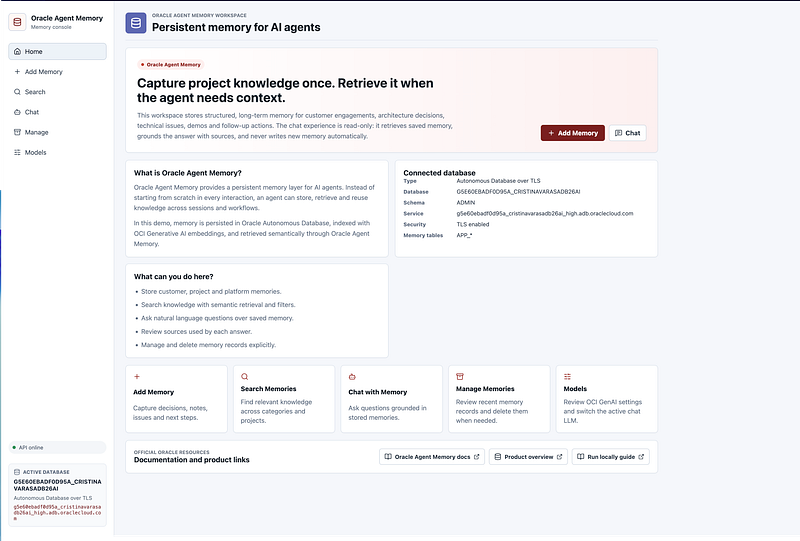
Once that worked, I added a backend endpoint to expose the active database configuration: GET /config/database.
This endpoint returns information such as database user, connection type, host, port, service name, schema, database name, TLS status and memory table prefix.
This may sound like a small feature, but it is very useful in demos and debugging. When you have a React frontend, APEX, ngrok and a backend running locally, it is helpful to see exactly which database the app is connected to.
In the UI, I added a card showing the active database connection so it is always clear which Autonomous Database is backing the memory store.
1.7 OCI Generative AI for embeddings and chat
The workspace uses OCI Generative AI for two different tasks: embeddings and chat completion.
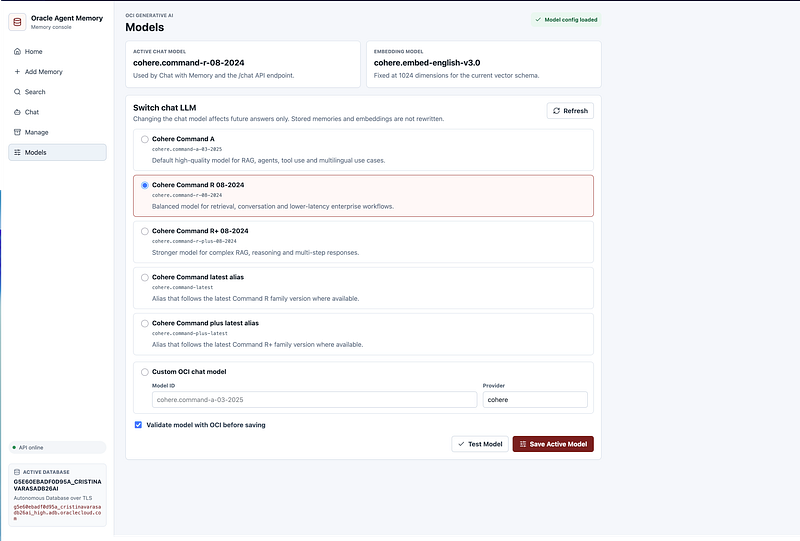
For embeddings, I used cohere.embed-english-v3.0 with 1024 dimensions.
For chat, the backend supports several Cohere models through OCI Generative AI, including Command A, Command R, Command R+, and latest model aliases where available.
The active chat model is configurable from the application.
This became one of the most useful features of the workspace. Different models can behave differently depending on the task: summarization, tracking notes, retrieval-augmented answers, technical explanations or multi-step reasoning. Having a Models page made it easier to test models before making one active.
The selected runtime model is stored in a local runtime configuration file that is ignored by Git. That means the active model can be changed during development without committing local runtime choices to the repository.
1.8 Oracle Agent Memory as the core memory layer
Oracle Agent Memory is the core of the system.
Each memory in the workspace has structured metadata: memory ID, title, content, category, customer project, tags, source and creation date.
The categories I used are aligned with project and customer-facing workflows: Customer Engagement, Internal Notes, Platform/Product, Technical Issue, Demo/PoC, Architecture and Follow-up/Next Steps.
This is important because memory becomes more useful when it is not just raw text.
A memory can represent a technical decision, a customer requirement, a demo status update, an architecture note, a blocker, a follow-up action, an implementation detail or a product-related note.
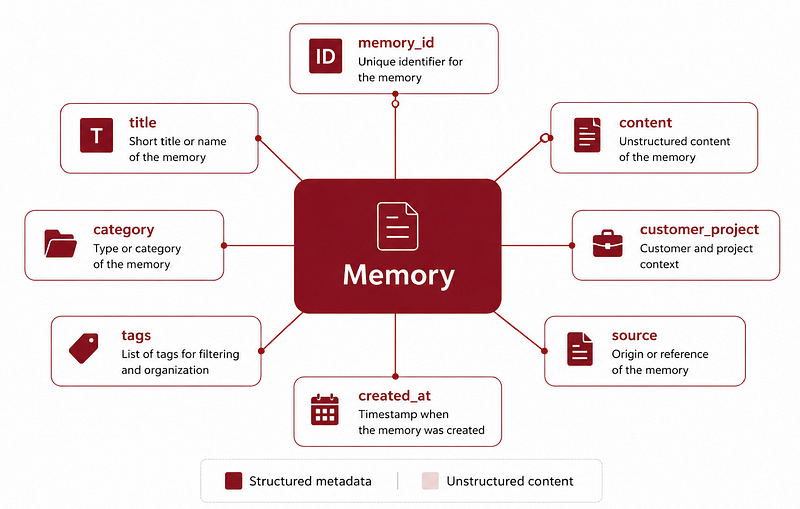
When the user searches or chats, the system can retrieve relevant memories semantically and still use structured filters such as project or category.
That combination is what makes the workspace practical.
1.9 The backend API
The main backend is implemented in FastAPI.
The key files are api.py and memory_service.py.
api.py exposes the REST API.
memory_service.py encapsulates the core logic: database connection, Oracle Agent Memory initialization, OCI embeddings, OCI chat model initialization, memory creation, semantic search, memory listing, memory deletion, chat over retrieved memory, model configuration and database configuration.
The backend exposes endpoints for health, configuration, memory creation, memory listing, semantic search, chat, model management and memory deletion.
The API returns clean JSON responses, which was especially important for the APEX integration.
For example, the chat endpoint returns an answer and a list of used memories. Each used memory includes information such as memory ID, title, content, category, project, tags, source, creation date, score and content preview.
Errors also follow a simple JSON shape with an error and a detail field.
This made debugging much easier from both React and APEX.
1.10 Authentication with X-API-Key
For development, I protected the backend with a simple API key mechanism.
Every request includes an X-API-Key header.
The key lives in the backend environment file and is also configured in the React and APEX layers.
If the key is missing or invalid, the backend returns a JSON error explaining that the API key header is missing or invalid.
This is good enough for local development and controlled demos.
For a production architecture, I would replace this with something more robust, such as OCI API Gateway, OCI Vault, APEX Web Credentials and proper application authentication.
But the simple API key was very effective for iterating quickly and safely.
1.11 The React workspace
The first polished interface was built with React/Vite.
The frontend lives in the frontend folder and runs locally at http://localhost:5173. It calls the backend at http://localhost:8000.
The React app includes Home, Add Memory, Search, Chat, Manage and Models pages.
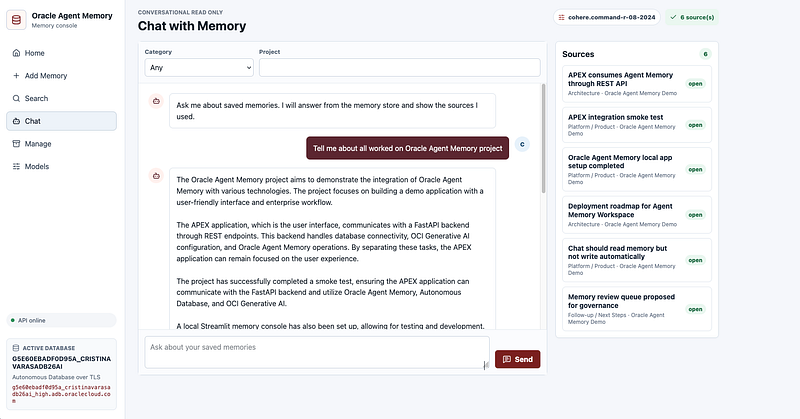
The Chat page is the heart of the experience.
It behaves like a lightweight ChatGPT-style workspace with a conversation layout, input at the bottom, project and category filters, active model visible, side panel with sources, expandable source details and plain text responses.
The key difference is that the answers are grounded in stored Oracle Agent Memory context.
The UI also makes the sources visible. For each answer, the user can inspect which memories were used, including content preview, full content, score, tags, date and memory ID.
That visibility is essential. If an assistant gives an answer based on memory, users should be able to inspect the memory behind it.
1.12 Bringing it into Oracle APEX
After the React app was working, I wanted to expose the same backend through Oracle APEX.
Why APEX?
Because APEX is extremely strong for building internal enterprise apps quickly, especially when you already operate in the Oracle ecosystem.
The APEX application consumes the same FastAPI backend using REST calls.
During development, APEX cannot call a backend running locally at http://localhost:8000 directly. So I exposed FastAPI temporarily with ngrok.
APEX stores the backend configuration in global application items: G_AGENT_MEMORY_API_URL and G_AGENT_MEMORY_API_KEY.
They are initialized in an Application Process. Then APEX calls the backend using APEX_WEB_SERVICE.MAKE_REST_REQUEST with the same X-API-Key header.
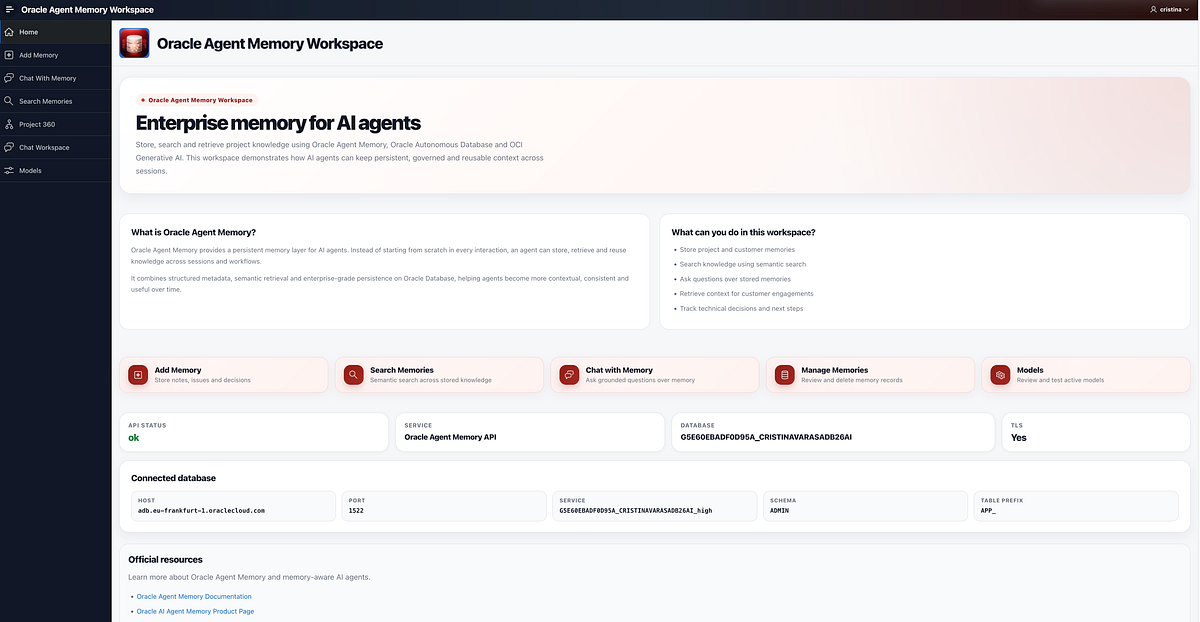
The APEX app now includes Home, Add Memory, Search Memories, Chat Workspace, Models and Project 360.
1.13 What the APEX app adds
The React app is the polished local frontend. But the APEX app adds an enterprise flavor.
It includes global API configuration, shared LOVs for categories and projects, APEX collections for chat history and sources, an API logging table, PL/SQL processes calling FastAPI, cards and reports for search results, a Chat Workspace page, a Models page and a Project 360 page.
The Chat Workspace uses APEX collections to store session-level chat history and the memories used by the latest response.
The Project 360 page uses predefined prompts to generate project summaries, customer tracking notes, risks and blockers, next steps, follow-up emails and slide bullets.
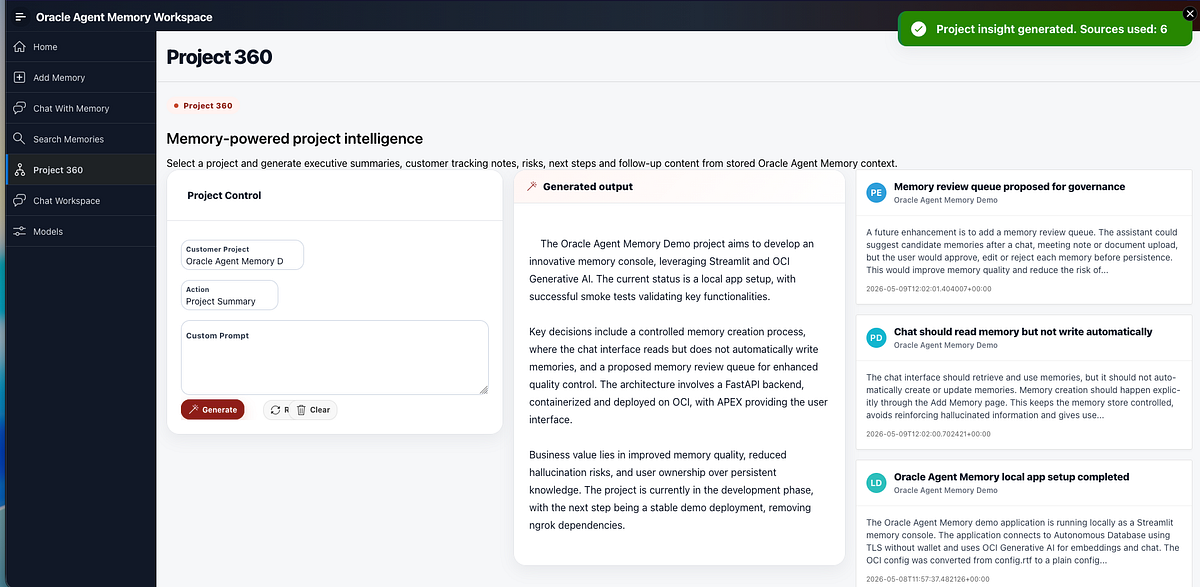
This makes the value of memory more visible. Instead of only asking individual questions, the user can generate project-level outputs from stored context.
1.14 Building with Codex, ChatGPT Enterprise and Visual Studio Code
A relevant part of this project was not only what I built, but how I built it.
The workspace was developed iteratively using a vibe coding workflow with Codex, ChatGPT Enterprise and Visual Studio Code.
I used prompts to accelerate the creation of the backend, the React frontend, the API structure, the model management logic, the ngrok helper script and several parts of the Oracle APEX integration.
But the important part is that this was not blind code generation.
Every generated piece had to be validated against the real environment: Oracle Autonomous Database, OCI configuration, OCI Generative AI models, Oracle Agent Memory, FastAPI endpoints, React API calls, APEX REST processes and GitHub project hygiene.
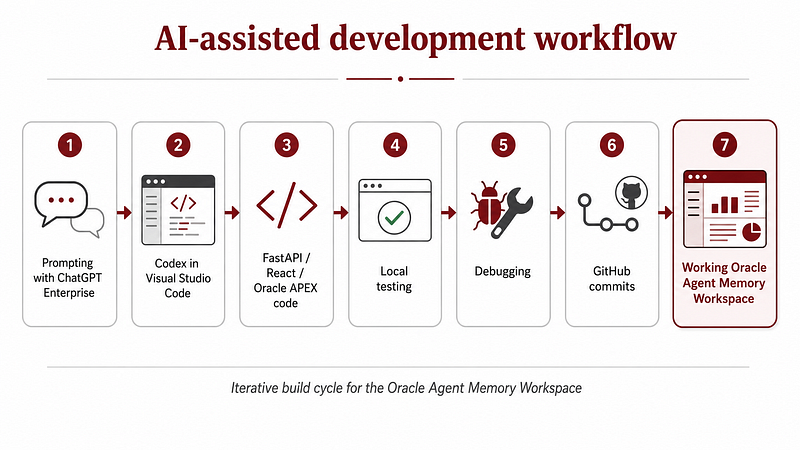
The workflow looked like this:
I started by defining the target architecture and expected behavior in prompts. Then Codex helped generate or refactor specific pieces of the project inside Visual Studio Code. After that, I tested each layer manually: database connectivity, OCI config loading, embeddings, chat model initialization, Oracle Agent Memory smoke tests, API responses, APEX payloads and UI behavior.
This made the process much faster, but still controlled.
For me, that is the most interesting part of AI-assisted development: it is not about asking the model to “build everything” and hoping it works. It is about using AI as an implementation accelerator while keeping human ownership of architecture, validation, security and product direction.
In this project, Codex helped me move quickly from idea to working application, but the architecture remained intentional.
- FastAPI became the integration layer.
- React became the polished local workspace.
- Oracle APEX became the enterprise frontend.
- Oracle Autonomous Database became the persistent memory store.
- OCI Generative AI provided embeddings and chat inference.
Oracle Agent Memory connected everything into a persistent memory layer.
This is also why I think this project is a good example of practical AI-assisted development: the value was not just in generating code, but in continuously turning prompts into tested, working software.
1.15 What this series will cover
This article is the architectural overview.
In the next parts, I will go deeper into the implementation.
Part 2/3 — FastAPI, Autonomous Database and OCI Generative AI
The second article will focus on the backend: project structure, environment variables, Autonomous Database connection over TLS, OCI config, Oracle Agent Memory initialization, embedding and chat model setup, memory_service.py, FastAPI endpoints, API key authentication, model switching, tests, ngrok helper and GitHub structure.
It will also explain more concretely how I used Codex and Visual Studio Code to scaffold, refactor and validate the backend implementation.
Part 3/3 — Bringing Oracle Agent Memory into Oracle APEX
The third article will focus on the APEX application: global application items, application processes, APEX web service calls, API logging, LOVs for categories and projects, Add Memory, Search Memories, Chat Workspace, Models, Project 360, APEX collections, debugging lessons and production architecture ideas.
This part will be especially useful for anyone who wants to expose an AI memory backend through an Oracle APEX application.
1.16 Current state
At this point, the workspace supports a local React app, FastAPI backend, Oracle Agent Memory, Autonomous Database over TLS, OCI Generative AI embeddings, OCI Generative AI chat, semantic memory search, read-only chat over memory, explicit memory creation, memory management, model testing and switching, Oracle APEX integration, Project 360 insight generation and API call logging.
The local app runs at http://localhost:5173.
The backend runs at http://localhost:8000.
FastAPI docs are available at http://localhost:8000/docs.
APEX consumes the backend through the current ngrok URL.
This is already enough for local demos, experimentation and iterative development.
1.17 What I would improve next
The current setup is great for local demos and prototyping.
For a more production-ready deployment, the next steps would be to deploy FastAPI on OCI, replace ngrok with OCI API Gateway, store secrets in OCI Vault, use APEX Web Credentials instead of hardcoded API keys, add richer audit logs, support multiple workspaces, support multiple Autonomous Database targets, improve the APEX UX to match the React app, add role-based access and add persistent chat sessions.
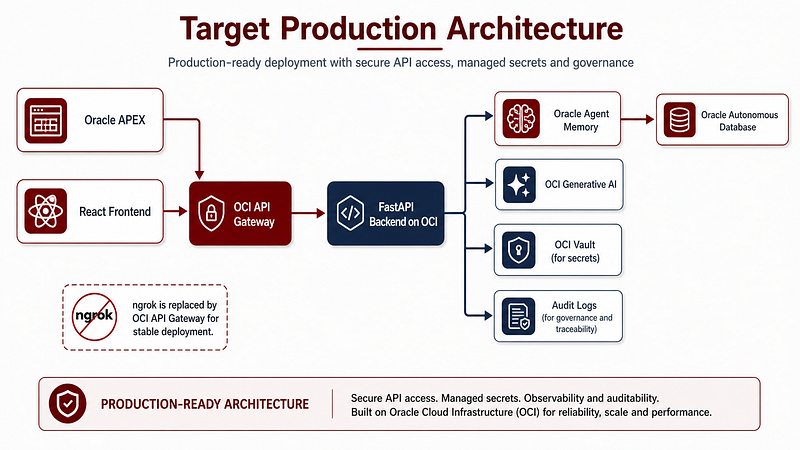
The target production architecture would be:
- Oracle APEX or React as frontend.
- OCI API Gateway as the stable public entry point.
- FastAPI backend deployed on OCI.
- Oracle Agent Memory as the memory layer.
- Oracle Autonomous Database as the persistent store.
- OCI Generative AI for embeddings and chat.
- OCI Vault for secrets.
- Audit logging for governance.
1.18 Final thoughts
This project started from a simple question:
What happens when an AI agent can remember useful context across sessions?
The most interesting part for me is that Oracle Agent Memory does not feel like an isolated AI component. It fits naturally into an enterprise architecture because the memory layer is backed by Oracle Database.
That matters.
Agent memory should not be a black box. It should be inspectable, governable, searchable and connected to the systems where enterprise data already lives.
This is where I think memory-aware agents become genuinely useful: not just answering isolated questions, but remembering the context that makes those answers relevant.
Next in the series: Building an Oracle Agent Memory Workspace — Part 2/3: FastAPI, Autonomous Database and OCI Generative AI.
And as always, if you are interested in Oracle, AI, Data Science, APEX, Autonomous Database and real enterprise AI demos, follow me here on Medium / LinkedIn to keep learning with me 🙂