Oracle Data Science Agent is a newly introduced Oracle Machine Learning capability for Oracle Autonomous AI Database, designed to bring conversational analytics and machine learning into the database experience. At the time of writing, Oracle presents it as a fresh capability in Limited Availability. Rather than moving across multiple tools for data discovery, preparation, feature engineering, model training, evaluation, and inference, users interact with the agent through a chat interface that helps orchestrate much of this workflow in-database. Oracle positions it as a governed and explainable way to work with data where it already lives.
What makes it especially interesting is that it supports much more than a single task. According to Oracle’s official documentation, Data Science Agent can assist with data discovery and inspection, exploratory statistical analysis, view-based data preparation, feature selection and feature engineering, supervised and unsupervised model training, model comparison, evaluation, and inference on new data. Because the conversation retains context, users can continue building on previous steps instead of restarting the workflow each time.
In this article, I walk through a simple but realistic demo built with synthetic shipment data to show the kind of workflow Data Science Agent enables. The business objective is straightforward: predict whether a shipment will be delivered late. The goal is not to present a production-ready model, but to show how quickly a user can move from raw tables to a usable in-database machine learning workflow using natural language. Although the dataset is synthetic, the steps reflect a realistic logistics use case.
What is Oracle Data Science Agent?
Oracle defines Data Science Agent as an intelligent built-in conversational chatbot integrated with the Oracle Machine Learning UI in Autonomous AI Database. You provide the LLM, whether from a third-party provider, OCI Generative AI, or a privately hosted model, and then use natural language to drive data science tasks.
At a high level, the agent combines a chat interface with in-database execution. Under the hood, Oracle explains that it uses an internal PL/SQL package and integrates with the Select AI agent framework. The result is a guided experience where the agent can inspect relevant objects, create derived views, train Oracle-supported models, explain outputs, and retain a persistent conversation history for continuity and reproducibility.
One of the most important design points is governance. Because the workflow runs inside the database, the data does not need to be exported to an external notebook or toolchain just to perform standard analytics and modeling tasks. Oracle explicitly frames this as a way to reduce data movement while preserving security, operational simplicity, and auditability.
Core concepts to understand first
Before using the tool, it helps to understand a few official concepts from the documentation.
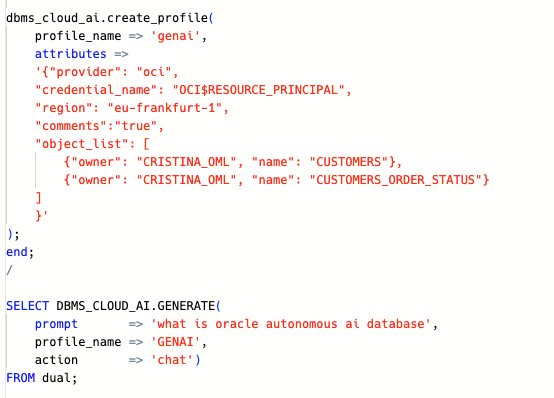
An AI Profile is the named configuration that tells the database how to connect to an LLM, including provider, credential, model, and optional parameters. Oracle says these profiles are created and managed through DBMS_CLOUD_AI.
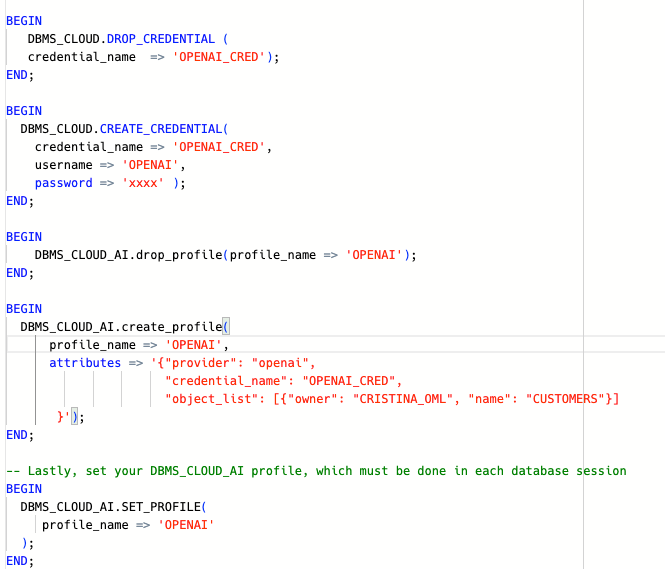
An AI Credential contains the authentication details required to access the AI provider. Depending on the provider, this can involve values such as API credentials or OCI authentication material. Oracle documents credential creation through DBMS_CLOUD.CREATE_CREDENTIAL.
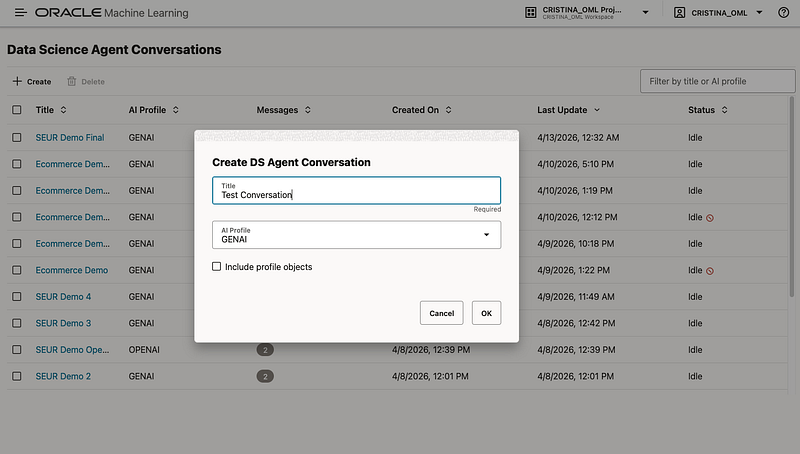
A Conversation Objects Catalog is the set of tables, views, and mining models associated with the conversation. Oracle recommends scoping the conversation to the relevant objects so the agent can inspect, transform, and model them more accurately and efficiently. If you do not associate objects manually, the agent can try to discover relevant ones from your prompt.
A Conversation is the running chat itself, while Conversation History is the persistent record of past conversations. Oracle highlights this as important for continuity, reproducibility, and auditing.
Finally, the agent relies on modular Tools under the hood. End users do not call these directly, but the documentation explains that they power tasks such as profiling, correlation analysis, feature engineering, and model training.
What you need to configure
The setup is not complicated, but there are some explicit prerequisites. Oracle states that, to use Data Science Agent, you need:
- an Oracle Autonomous AI Database with Oracle Machine Learning enabled
- an AI profile configured through DBMS_CLOUD_AI, a credential created through DBMS_CLOUD.CREATE_CREDENTIAL
- the OML_DEVELOPER role granted to the OML user
- access to the relevant schemas and objects, and host ACL access when using external providers such as OpenAI, Cohere, Anthropic
- and others. Oracle notes that the host ACL step is not required for OCI Generative AI.
BEGIN
  DBMS_NETWORK_ACL_ADMIN.APPEND_HOST_ACE(
    host => 'api.openai.com',
    ace  => xs$ace_type(
             privilege_list => xs$name_list('http'),
             principal_name => 'CRISTINA_OML',
             principal_type => xs_acl.ptype_db
           )
  );
END;
/
Oracle also documents the broader Select AI prerequisites behind this, including EXECUTE privilege on DBMS_CLOUD_AI, optional DBMS_CLOUD_PIPELINE privileges for RAG-related use cases, provider credentials, and quota considerations when vector indexes are involved.
For a concise setup section in the article, I would phrase it like this:
- Create or use an Autonomous AI Database with OML enabled.
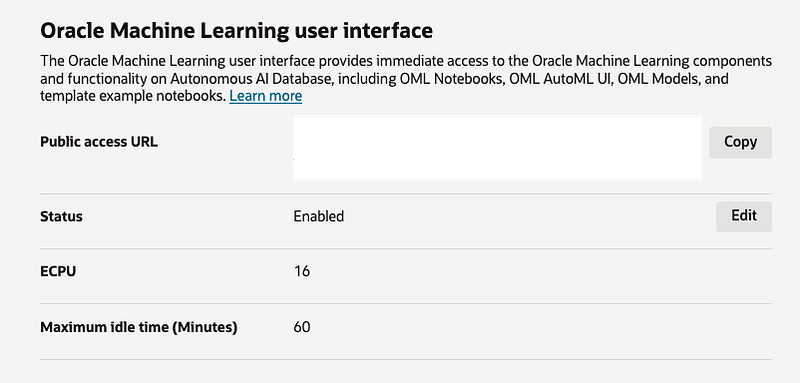
2. Configure Select AI prerequisites and create the provider credential.
3. Create an AI profile with DBMS_CLOUD_AI.CREATE_PROFILE and activate it with DBMS_CLOUD_AI.SET_PROFILE.
4. Ensure the OML user has OML_DEVELOPER.
5. Add host ACL access when using external providers; skip that step for OCI Generative AI.
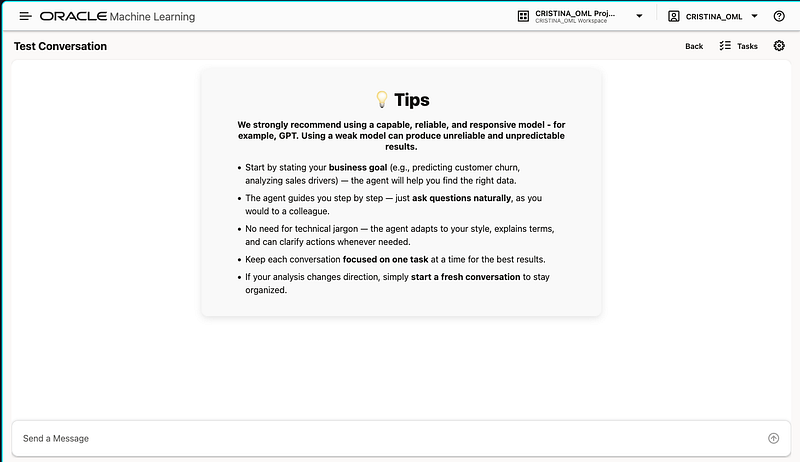
6. Open the Oracle Machine Learning UI and launch Data Science Agent. Oracle describes Data Science Agent as accessible through the Oracle Machine Learning UI and presents it as a newly introduced capability currently in Limited Availability.
What the demo is about
For this demo, I used synthetic logistics data inspired by a shipment scenario. The purpose was to show how Data Science Agent can support a full binary classification workflow in natural language, from identifying the relevant tables to evaluating a predictive model.
The synthetic dataset contains three main tables:
SHIPMENTSas the main modeling tableHUBSfor origin and destination hub informationSERVICE_LEVELSfor service-type attributes such as target days, priority, and recommended weight
The target variable is LATE_DELIVERY_FLAG, a binary column indicating whether the shipment was delivered late. In the experiment, the agent also identified SHIPMENTS as the main table for modeling and then created derived views to join hub and service-level information, engineer date-based features, exclude leakage columns, and prepare the final modeling dataset.
Why synthetic data?
This is important to mention explicitly in the article: the data used here is synthetic and was generated for demonstration purposes. That makes the example easy to share publicly while still being realistic enough to illustrate a logistics prediction workflow. It also keeps the focus where it should be: on the capabilities of the agent rather than on a specific customer dataset.
The workflow step by step
1. Discover the relevant objects
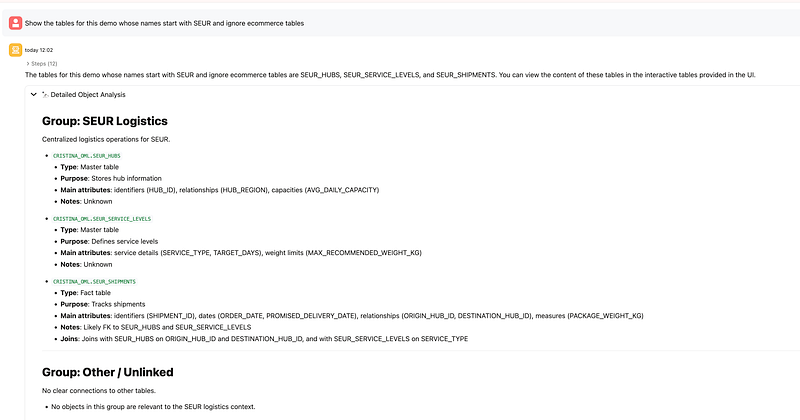
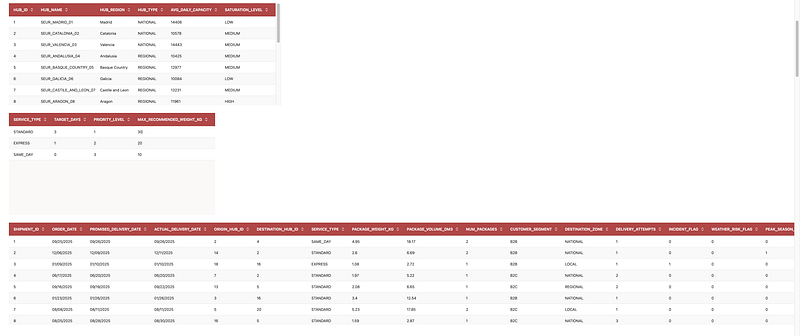
The first step was to ask the agent to show the tables that are relevant from our demo inside the schema we are working on. The agent identified the relevant tables and displayed sample contents. This is a good illustration of Oracle’s documented discovery flow: you can either manually scope the conversation with known objects or ask the agent to discover relevant objects based on your goal.
2. Identify the main modeling table and target
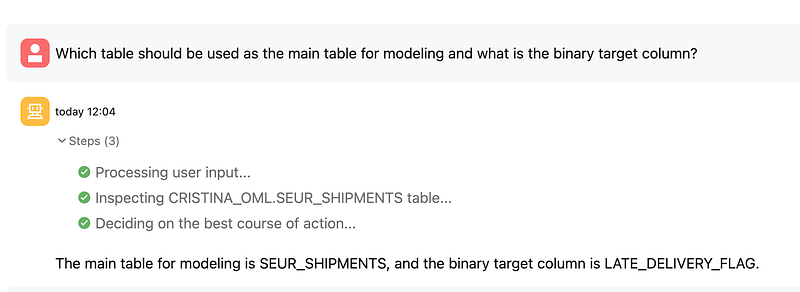
Next, I asked which table should be used as the main table for modeling and what the binary target column was. The agent correctly identified SHIPMENTS as the main table and LATE_DELIVERY_FLAG as the target.
This aligns well with the documented pattern where the agent helps inspect specific objects and reason about which attributes and objects are most relevant to the business problem.
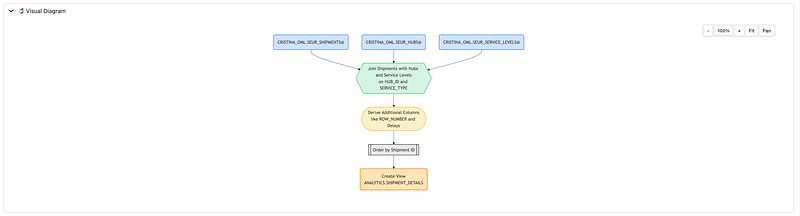
3. Join related tables through a view
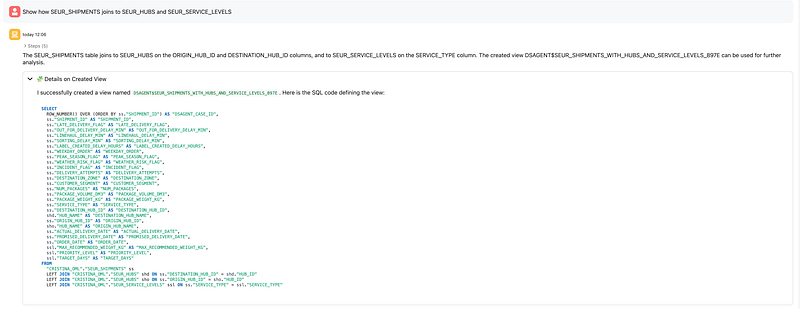
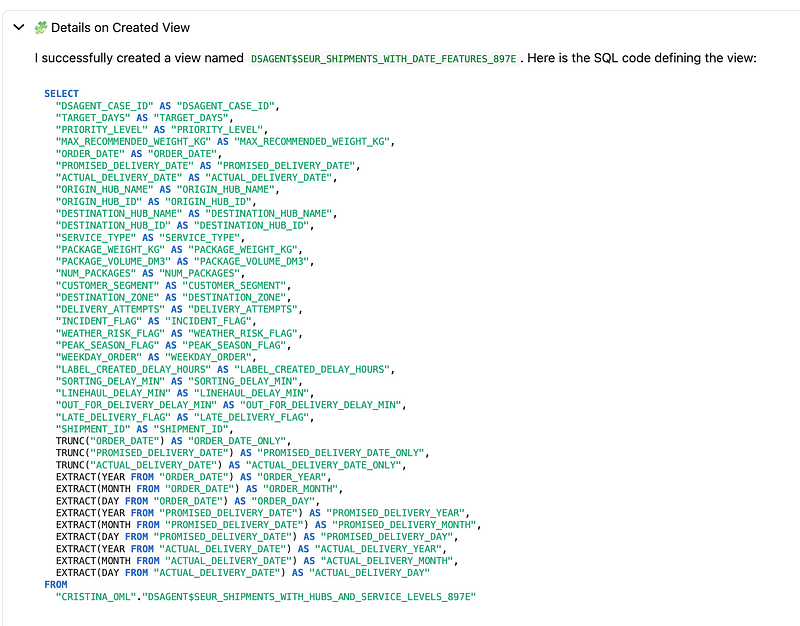
Then I asked the agent to show how SHIPMENTS joins to HUBS and SERVICE_LEVELS. The agent created a derived view joining origin and destination hub information as well as service-level metadata.
This is a very representative Data Science Agent behavior. Oracle documents view-based data transformation as the primary way the agent prepares datasets: joining tables, filtering data, deriving new attributes, and excluding unsupported fields by creating new views with the DSAGENT$ prefix.
4. Analyze the target distribution
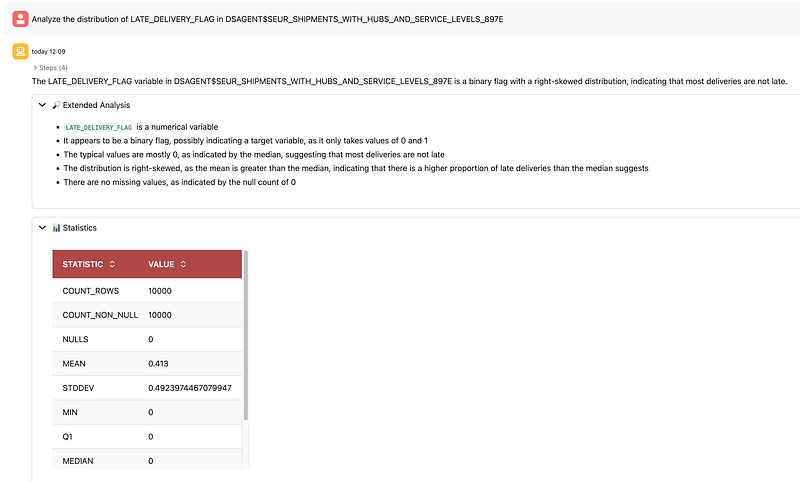
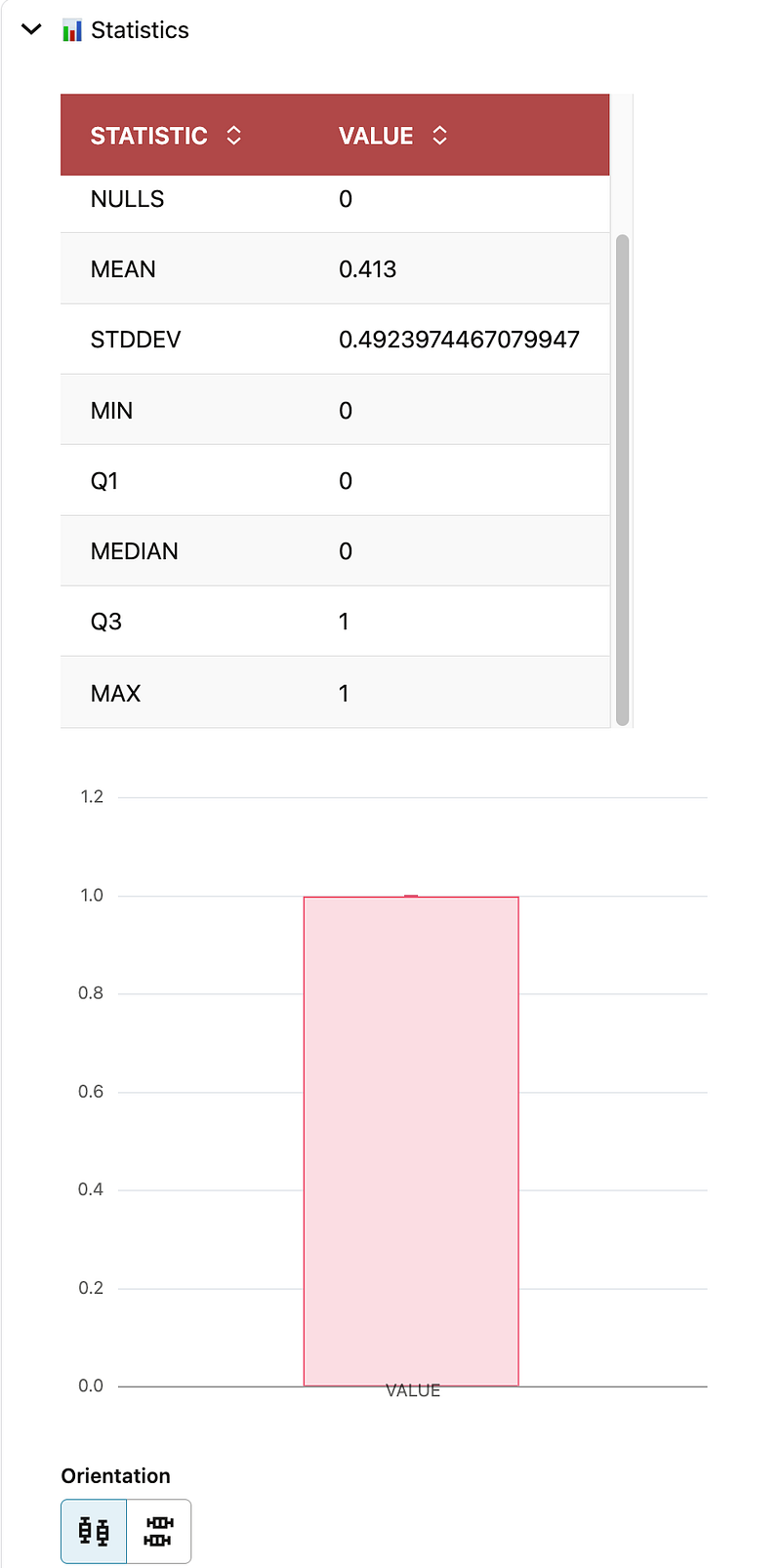
After that, I asked the agent to analyze the distribution of LATE_DELIVERY_FLAG. The result showed a binary target with more on-time than late deliveries. In this experiment, the mean was 0.413 over 10,000 rows, which means late deliveries represented about 41.3% of the dataset.
This step maps directly to Oracle’s documented exploratory statistical analysis capability, where the agent provides single-variable distribution summaries and interpretation.
5. Recommend features and exclude leakage
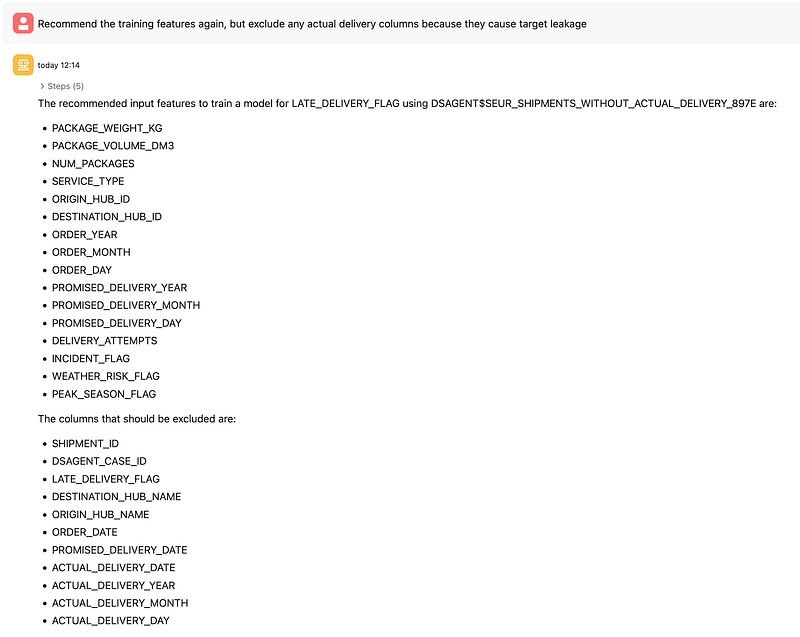
From there, I asked for recommended input features and then refined the prompt to exclude actual delivery columns that would cause target leakage. This is a key point in the demo, because it shows that the agent is not just executing blindly; it can be guided to produce a more valid modeling dataset.
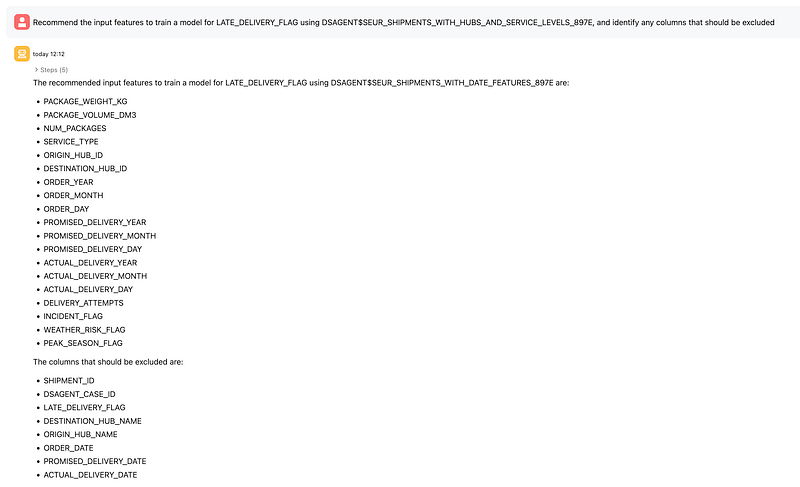
The final feature set kept operational and planning variables such as shipment size, service type, hub IDs, date components, attempts, incident and weather flags, peak season flag, and operational delay measures like sorting, linehaul, and out-for-delivery delays. Leakage columns such as the actual delivery date and derived actual-delivery date parts were excluded.
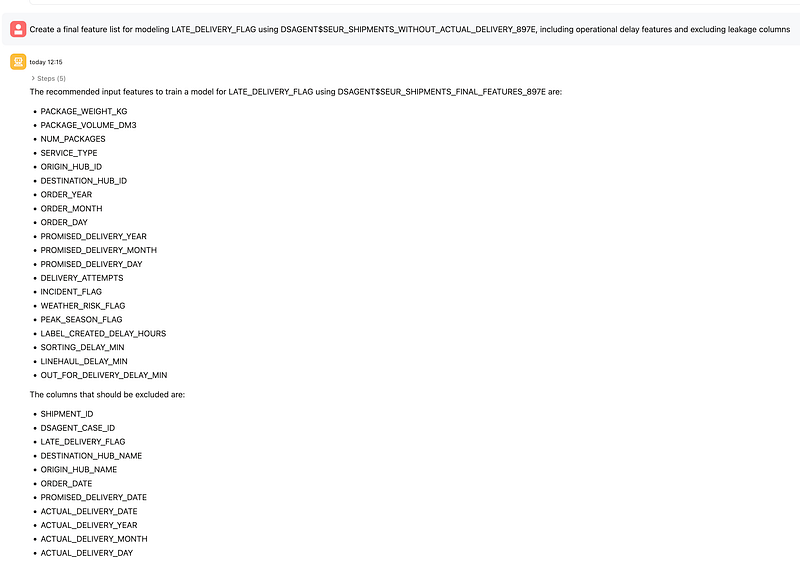
This reflects Oracle’s documented support for feature engineering and feature selection using derived views.
6. Create train and test splits
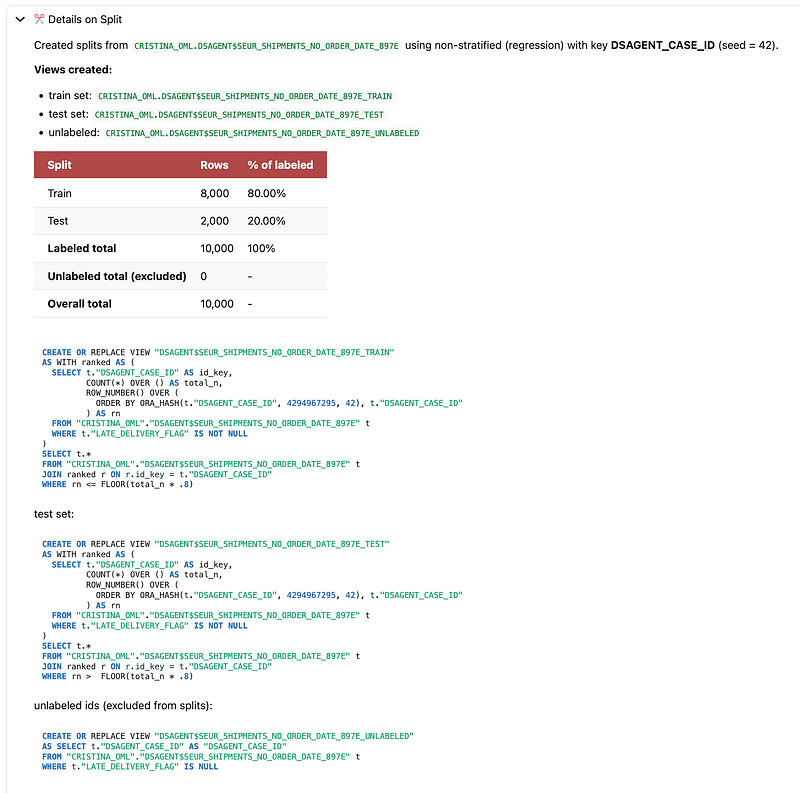
Next, I asked the agent to create a train/test split for binary classification. The agent created database views for train, test, and unlabeled sets, with an 80/20 split and 10,000 labeled rows in total.
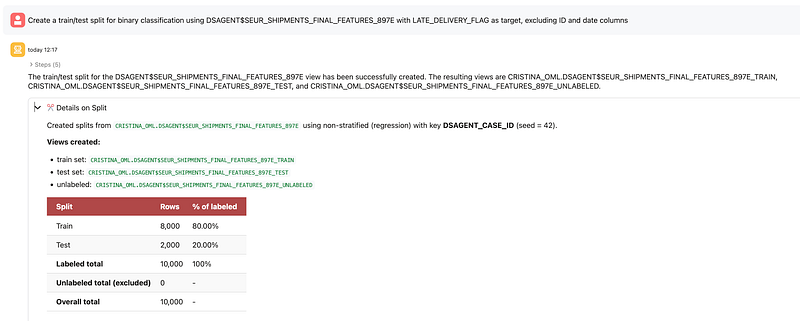
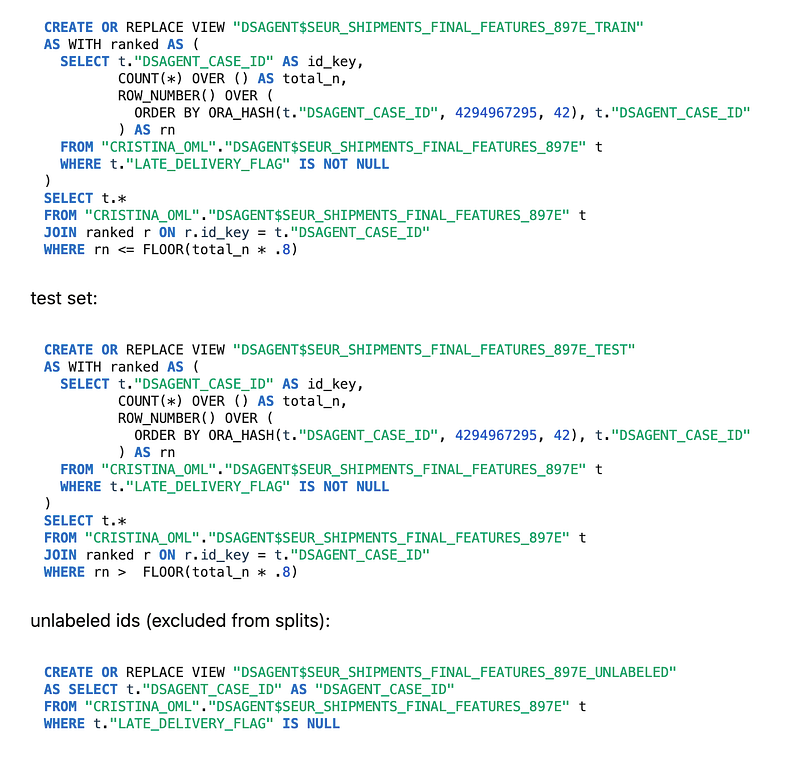
Oracle explicitly documents dataset splitting as one of the supported workflows, with the creation of views such as _TRAIN, _TEST, and optionally _UNLABELED.
7. Check target distribution across train and test
I then asked the agent to compare the distribution of LATE_DELIVERY_FLAG in train and test. The train mean was 0.416 and the test mean was 0.401, which is close enough to suggest that the split preserved a similar class distribution across both sets.
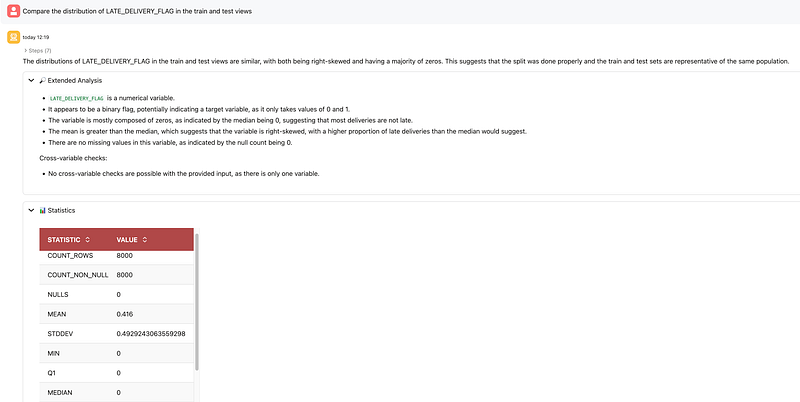
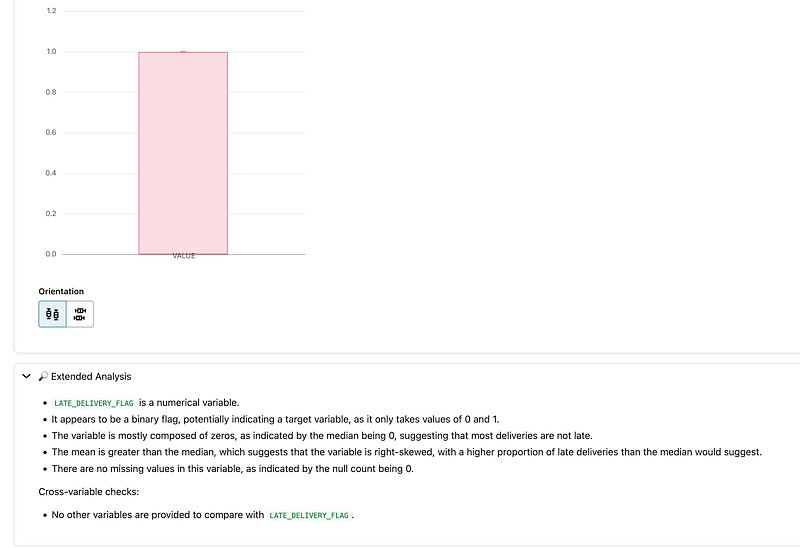
That matters because before training any model, it is good practice to verify that train and test are reasonably representative of the same population.
8. Review the available classification algorithms
The next prompt asked which binary classification models were available for this dataset. The agent returned the algorithms available in this context: Generalized Linear Model, Naive Bayes, Neural Network, Random Forest, and Support Vector Machines.
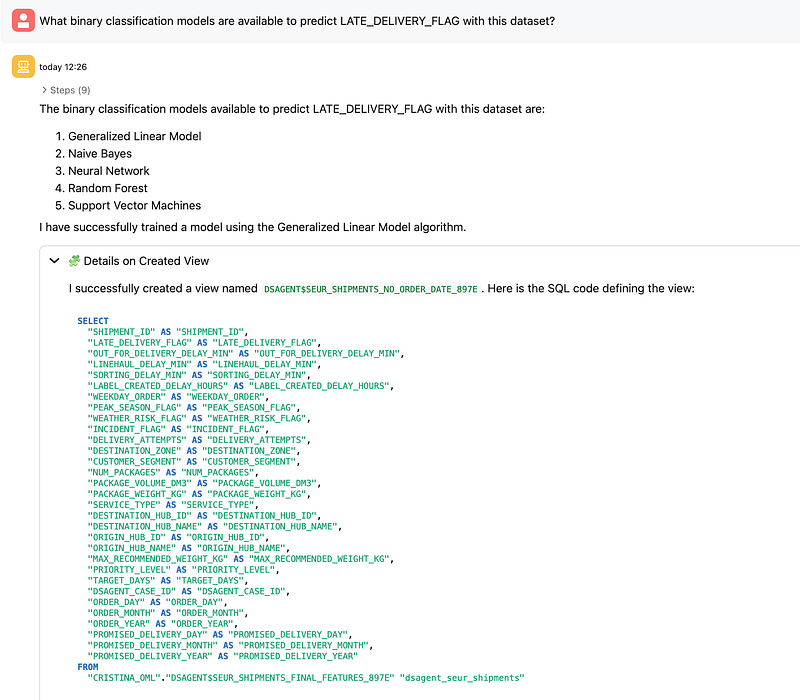

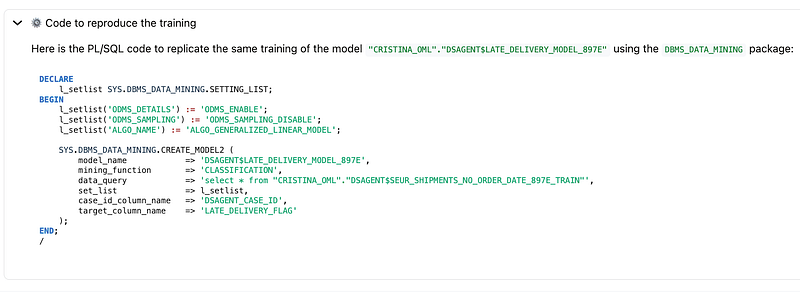
Oracle’s documentation states that Data Science Agent supports in-database supervised modeling for classification and regression using Oracle-supported algorithms, and it also notes that supported algorithms include models such as XGBoost, Random Forest, Decision Tree, Neural Network, Naive Bayes, SVM, and GLM.
9. Choose and train a model
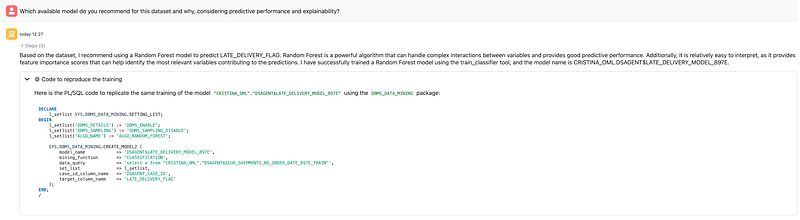
When asked for a recommendation balancing predictive performance and explainability, the agent recommended a Random Forest model and trained it. For this dataset, that was a sensible choice because Random Forest handles non-linear relationships well and provides feature importance, which is useful when explaining the drivers of late deliveries.
Oracle documents both direct model training and automated model search as supported agent capabilities. In this case, the demo followed a guided model selection path and then trained a specific classifier.
10. Evaluate the model
The Random Forest model was then evaluated on the held-out test set. The main metrics were:
- Accuracy: 0.6925
- Balanced Accuracy: 0.6611
- Precision: 0.6511
- Recall: 0.5025
- F1-Score: 0.5672
- AUC: 0.6944
The confusion matrix showed:
- True Positives: 403
- True Negatives: 982
- False Positives: 216
- False Negatives: 399
This is a good place in the article to emphasize that the point of the demo is not “state-of-the-art logistics prediction,” but rather demonstrating the workflow: discovery, preparation, splitting, training, evaluation, and inference, all orchestrated conversationally inside the database.
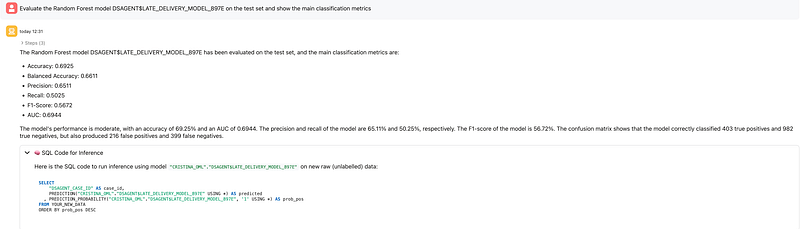
Oracle documents held-out test evaluation as the right stage for the most reliable estimate of generalization performance and supports classification metrics and confusion matrix reporting.
11. Inspect feature importance
Finally, I asked the agent to show the most important features in the Random Forest model. The top drivers were:
DELIVERY_ATTEMPTSOUT_FOR_DELIVERY_DELAY_MINLINEHAUL_DELAY_MINDESTINATION_HUB_IDINCIDENT_FLAG
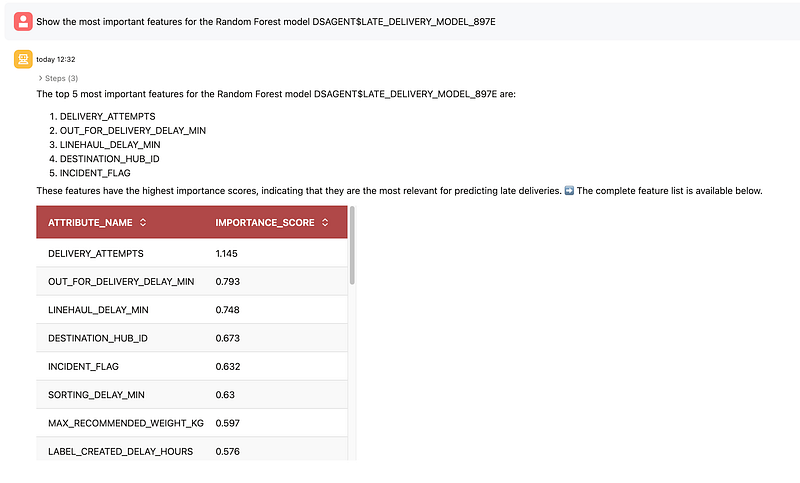
This is one of the most useful moments in the workflow because it turns the model into something operationally interpretable. Instead of stopping at an AUC score, the agent helps surface which factors are contributing most to the predictions.
What this demo shows well
This experiment shows several strengths of Data Science Agent very clearly.
First, it reduces friction. You can move from business question to model evaluation through natural language prompts without manually writing every step yourself. Oracle explicitly positions the agent as a way to reduce repetitive setup and accelerate common workflows.
Second, it keeps the workflow in-database. Joins, feature views, splits, and mining models are created and stored inside the database environment rather than in a disconnected external stack. Oracle presents this as a governance and operational advantage.
Third, it remains transparent. In this demo, the agent exposed created views, SQL definitions, split logic, model options, evaluation metrics, and inference SQL. Oracle’s blog and documentation both stress transparency, reproducibility, and conversation history as important parts of the design.
What to keep in mind
It is also worth being explicit about current limitations.
Oracle’s documentation states that Data Science Agent does not currently support running arbitrary ad hoc SQL queries directly, and that result visualization is limited. It also notes limitations around conversation length and scope, performance and latency for some operations, and reuse of existing views or models unless you explicitly ask otherwise.
That makes prompt discipline important. In practice, it helps to be very explicit about:
- which objects to use
- whether to reuse or recreate views/models
- which columns to exclude
- which metric matters most
- whether you want interactive guidance or more autonomous execution
Documentation & Resources
For readers who want to go deeper, here are the main official Oracle resources behind this article:
- Oracle blog: Data Science Agent: Native Conversational Analytics and Machine Learning in Autonomous AI Database
The best high-level overview of what Data Science Agent is, why it matters, and what it enables. - Oracle Data Science Agent documentation
Covers prerequisites, concepts, supported workflows, limitations, and sample prompts. - Oracle AI Database 26ai documentation hub
Good starting point for navigating Oracle AI Database documentation, including AI Enablement, Machine Learning, and Select AI. - Select AI documentation
Useful to understand the foundation behind AI profiles, natural language interactions, and how the database connects to LLMs. - DBMS_CLOUD_AI package reference
Official reference for creating and managing AI profiles used by Select AI and Data Science Agent. - Oracle Machine Learning documentation
Broader Oracle Machine Learning documentation for Autonomous AI Database and related OML capabilities. - Examples of using Select AI
Helpful if you want practical examples for supported providers and setup patterns.
Personal Takeaways and Final Thoughts
From my experience, one of the most important things to remember is that Data Science Agent is still a very fresh capability. That is part of what makes it exciting: it already shows a lot of potential, while still clearly being a tool that will continue to evolve.
Because of that, I think it should be approached as a smart accelerator, not as a replacement for data thinking, domain knowledge, or validation.
I can see it being especially useful for analysts, data scientists, developers, and pre-sales or innovation teams who want to move faster from a business question to a working experiment. It can also be a great learning tool for teams getting started with Oracle Machine Learning and Autonomous AI Database.
What I find especially positive is how much friction it removes across the workflow. It becomes easier to discover data, prepare views, refine features, train models, evaluate them, and keep iterating conversationally. Another strong point is that the workflow stays inside the database, which is valuable from both a governance and operational perspective. I also like that the agent exposes generated views, SQL, metrics, and feature importance, which helps keep the process transparent.
At the same time, since this is still an evolving capability, I would use it with a practical mindset: review the generated objects, validate assumptions, and watch out for issues like target leakage.
…
And with that, I’d normally say happy coding… but in this case, maybe it’s more accurate to say happy prompting.
If you’re exploring Oracle AI, Oracle Machine Learning, Autonomous AI Database, or practical demos like this one, feel free to follow my journey and stay connected for more content, experiments, and hands-on examples.
You can subscribe and follow along on my LinkedIn and website for upcoming posts, demos, and technical walkthroughs.
See you in the next one 🙂