Shapefiles are a common geospatial vector data format used in Geographic Information Systems (GIS) software. A complete shapefile dataset is composed of several files, each serving a specific purpose. However, sometimes users may encounter missing components in a shapefile dataset, leading to incomplete data representation. This article guides you through reconstructing missing shapefile components using Python, enabling seamless integration with Oracle Spatial Studio or any other GIS tool that supports shapefiles.
Understanding Shapefile Components
A shapefile dataset typically includes the following files:
- .shp (Shapefile): Contains geometric data of the shapes (points, lines, polygons).
- .shx (Shape Index Format): Index file that facilitates efficient access to the geometric data in the .shp file.
- .dbf (DataBase File): Attribute format file storing feature data in tabular format, linked to the shapes in the .shp file.
- .prj (Projection Format): Contains coordinate system and projection information.
Each component plays a critical role in ensuring the shapefile functions correctly within GIS applications.
Recreating Missing Shapefile Components
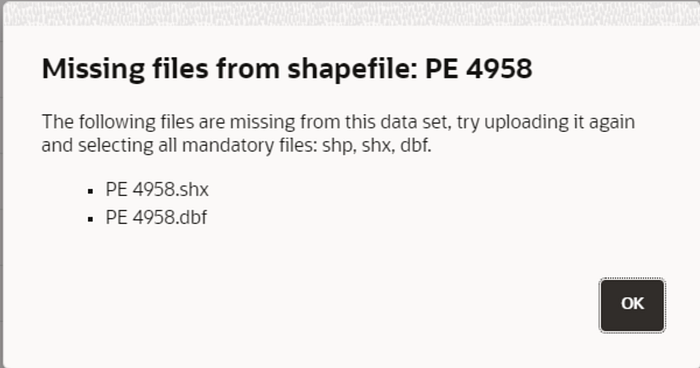
If you receive an incomplete shapefile dataset like in the image above, you can recreate the missing components using Python libraries such as GeoPandas and Fiona. Below is a Python script designed to regenerate the missing .shx, .dbf, and .prj files from an existing .shp file.
import geopandas as gpd
import fiona
import os
from fiona import Env
from pyproj import CRS

def create_missing_files(shp_file_path, crs_epsg=4326):
    # Set SHAPE_RESTORE_SHX config option to YES
    with Env(SHAPE_RESTORE_SHX='YES'):
        try:
            # Load the .shp file using geopandas
            gdf = gpd.read_file(shp_file_path)

            # Extract the path and filename without extension
            file_path = os.path.splitext(shp_file_path)[0]

            # Save the GeoDataFrame back to files including .shp, .shx, and .dbf
            gdf.to_file(file_path + ".shp")

            # Verify creation of the .shx and .dbf files
            if os.path.exists(file_path + ".shx") and os.path.exists(file_path + ".dbf"):
                print("Files generated successfully:")
                print(f"{file_path}.shp")
                print(f"{file_path}.shx")
                print(f"{file_path}.dbf")
            else:
                print("Failed to generate .shx or .dbf files.")

            # Generate the .prj file
            crs = CRS.from_epsg(crs_epsg)
            prj_file_path = file_path + ".prj"
            with open(prj_file_path, 'w') as prj_file:
                prj_file.write(crs.to_wkt())
            print(f"{prj_file_path} generated successfully.")
        except Exception as e:
            print("Error:", e)

# Example usage
shp_file_path = 'path_to_your_shp_file_path'
create_missing_files(shp_file_path)
Required Libraries
- GeoPandas: A powerful library that extends the capabilities of pandas to allow spatial operations on geometric types. It is used for reading, writing, and handling geospatial data.
- Fiona: A library for reading and writing vector data. It handles the interaction with file formats and supports reading and writing the components of shapefiles.
- pyproj: A Python interface to the PROJ library, which is used for cartographic transformations and projections. It helps in defining and generating the .prj file.
- os: A standard Python library for interacting with the operating system. It is used here to manipulate file paths.
Explanation of the Script
- Loading Libraries: The script imports the necessary libraries:
geopandasfor handling geospatial data,fionafor file operations,osfor file path manipulations, andpyprojfor dealing with coordinate reference systems (CRS). - Setting Environment: The
fiona.Envcontext manager sets theSHAPE_RESTORE_SHXenvironment variable to ‘YES’, enabling the restoration of missing .shx files. - Extracting File Path: The script extracts the base name of the shapefile (without the extension) to use as a base for generating other related files.
- Saving Files: The
gdf.to_filemethod saves the GeoDataFrame back to the shapefile format, automatically generating the .shx and .dbf files if they are missing. - Verification: The script checks if the .shx and .dbf files are successfully created and provides feedback.
- Creating .prj File:
- The script generates the .prj file, which contains the coordinate reference system information.
- It uses the
pyprojlibrary to obtain the CRS from the EPSG code (default is 4326, which corresponds to WGS84). - The CRS is written to the .prj file in WKT (Well-Known Text) format.
7. Example Usage: This part of the script demonstrates how to use the create_missing_files function with a sample shapefile path.
Practical Application with Oracle Spatial Studio
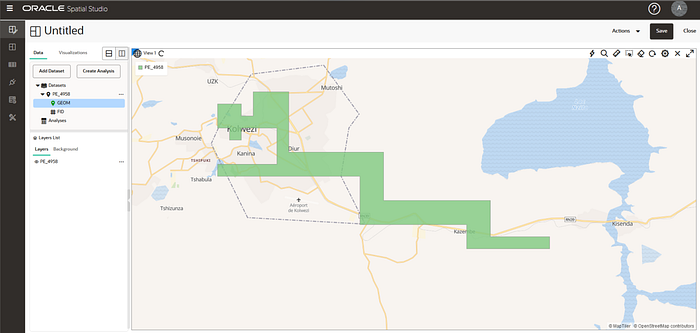
Once the missing files are recreated, you can import the complete shapefile dataset into Oracle Spatial Studio for visualization and analysis. Here’s a brief overview of how to do this:
- Open Oracle Spatial Studio and navigate to the “Data” section.
- Upload the Shapefile: Click on “Add Dataset” and select the .shp file along with the regenerated .shx, .dbf, and .prj files.
- Visualize and Analyze: The shapefile will now be ready for visualization and spatial analysis within Oracle Spatial Studio.
Conclusion
Reconstructing missing shapefile components is a straightforward process using Python. By understanding the role of each file in a shapefile dataset, you can ensure your geospatial data is complete and ready for use in Oracle Spatial Studio or any other GIS application. The provided Python script offers a practical solution to handle incomplete shapefile datasets, enabling you to focus on spatial analysis and decision-making.
Feel free to customize the script and the explanation to fit your specific needs. With these steps, you’ll be well-equipped to handle incomplete shapefile datasets and leverage them effectively in your geospatial projects.
For more information you can find me on LinkedIn, happy coding! 🙂