Oracle Analytics Cloud (OAC) and Oracle APEX are powerful tools in their own right, offering advanced analytics and robust application development capabilities. Combining the two can provide even greater value, allowing you to seamlessly integrate interactive analytics into your APEX applications. In this guide, we’ll walk through the steps to embed OAC dashboards and visualizations within an APEX application.
Prerequisites
Before we begin, make sure you have the following:
- Access to Oracle Analytics Cloud with appropriate permissions to create and share dashboards.
- An Oracle Application Express workspace and application set up.
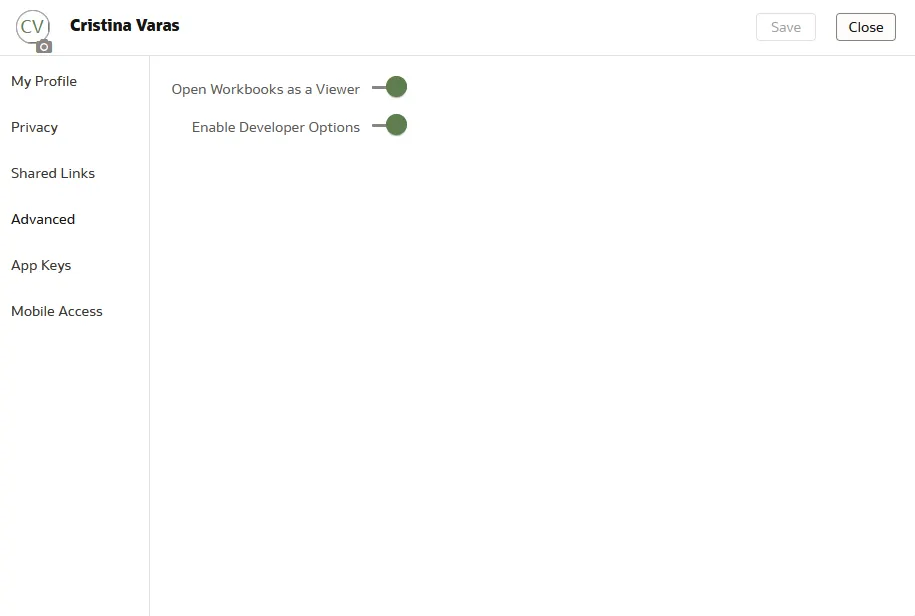
Step 1: Enable Developer Mode in OAC
- Log in to Oracle Analytics Cloud.
- Navigate to the “Developer” section.
- Enable Developer Mode going to “Profile” to access advanced embedding options.
Step 2: Create an Embedded URL in OAC
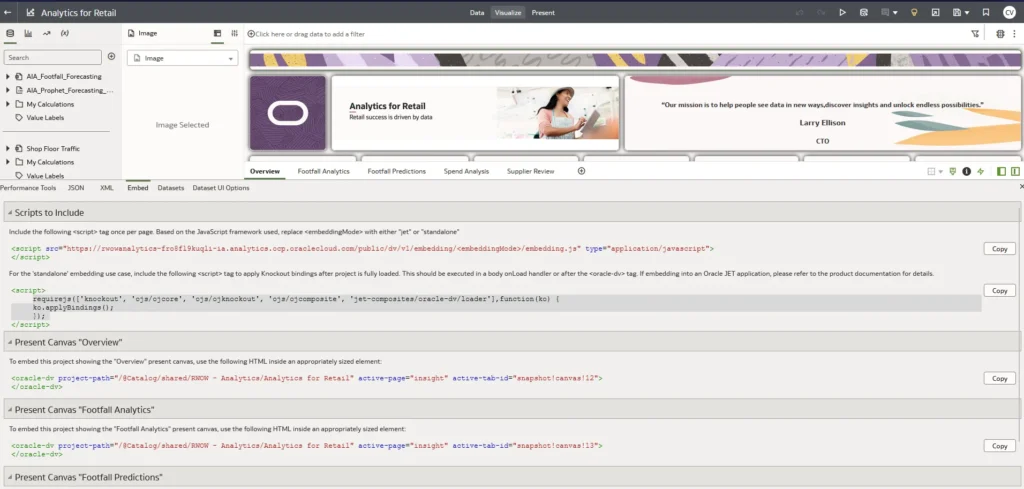
- Log in to Oracle Analytics Cloud.
- Navigate to the dashboard or visualization you want to embed.
- Click on the ellipsis (…) menu and select “Embed” from the dropdown.
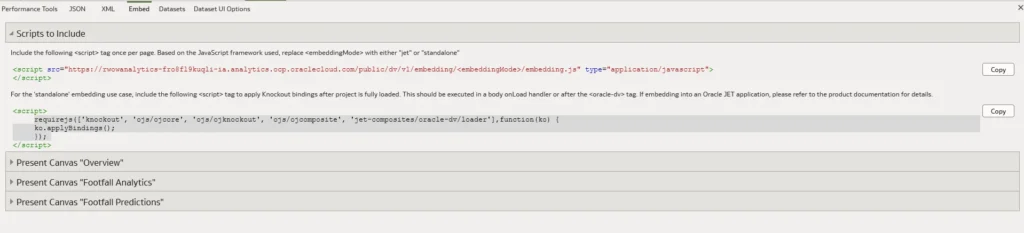
- Look for the JavaScript code snippet provided under embedding options.
Step 3: Add a Static Region in APEX
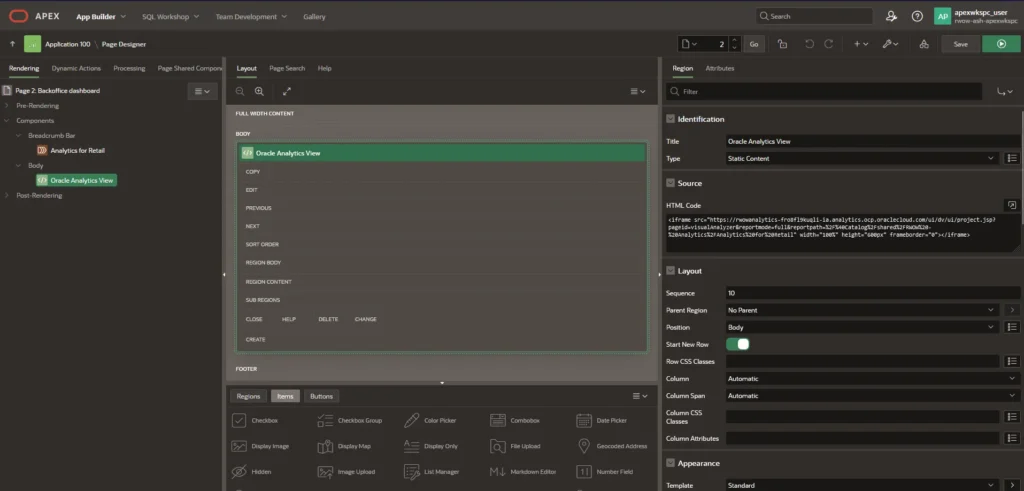
- Open your APEX application in the APEX Application Builder.
- Navigate to the page where you want to embed the OAC content.
- Add a new region of type “Static Content” to the page.
- Paste the iframe HTML code copied from OAC into the “Static Content” field of the region.
- Adjust any other settings as needed (e.g., height, width).
Step 4: Load JavaScript for Embedding
When embedding Oracle Analytics Cloud (OAC) content into an Oracle APEX page, you typically need to include a JavaScript file provided by OAC to handle the embedding process. This JavaScript file contains functions and utilities necessary for embedding OAC content dynamically into web pages.
Using requirejs
In APEX, you can dynamically load external JavaScript files using requirejs. Requirejs is a JavaScript file and module loader that helps manage dependencies between JavaScript files and modules.
How to Load the JavaScript File
Use requirejs to Load the JavaScript File: In the JavaScript section of your APEX page, use the requirejs function to dynamically load the required JavaScript file for embedding OAC content. You can find this code in the Embed section under the developer section.
requirejs(['jquery','knockout','ojs/ojcore', 'ojs/ojknockout', 'ojs/ojcomposite', 'obitech-application/application', 'jet-composites/oracle-dv/loader'], function($, ko, application) {
        ko.applyBindings();
        });
- The first parameter of the
requirejsfunction is an array containing the URLs of the JavaScript files to load. In this case, we’re providing the URL of theembedding.jsfile provided by OAC. - The second parameter is a callback function that is executed after the JavaScript file is loaded successfully. You can use this callback function to perform any additional actions or configurations if needed.
In the JavaScript section of your APEX page, use Knockout.js to apply bindings.
After loading the required JavaScript files for embedding Oracle Analytics Cloud (OAC) content using requirejs, you need to apply bindings using Knockout.js.
What are Bindings?
In the context of Knockout.js, “bindings” are special attributes added to HTML elements that define how the element interacts with a JavaScript view model. Bindings connect HTML elements to data in the view model, allowing changes in the data to automatically update the UI, and vice versa.
Why Use Knockout.js?
Knockout.js simplifies the process of creating dynamic and responsive user interfaces by providing a clean and efficient way to manage data bindings between HTML elements and JavaScript objects. Some benefits of using Knockout.js include:
- Declarative Bindings: Bindings are declared directly in the HTML markup, making it easy to understand and maintain the code.
- Automatic UI Updates: Changes in the data automatically update the UI, eliminating the need for manual DOM manipulation.
- Modular and Extensible: Knockout.js supports modular development and can be easily extended with custom bindings and plugins.
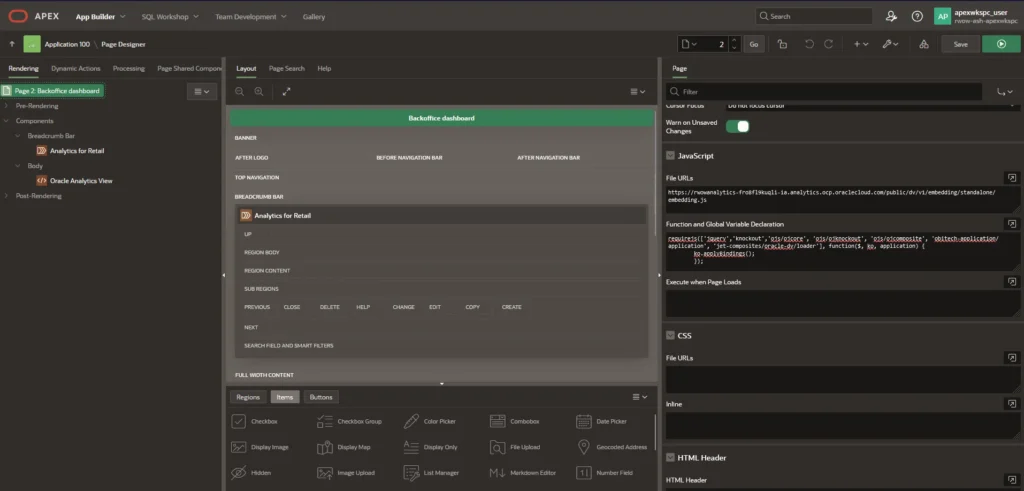
In summary, this code dynamically loads Knockout.js and other required modules using requirejs, and then applies Knockout.js bindings to the HTML elements in the APEX page, allowing for dynamic data binding and interaction between the UI and the underlying JavaScript view model.
Et voilà!
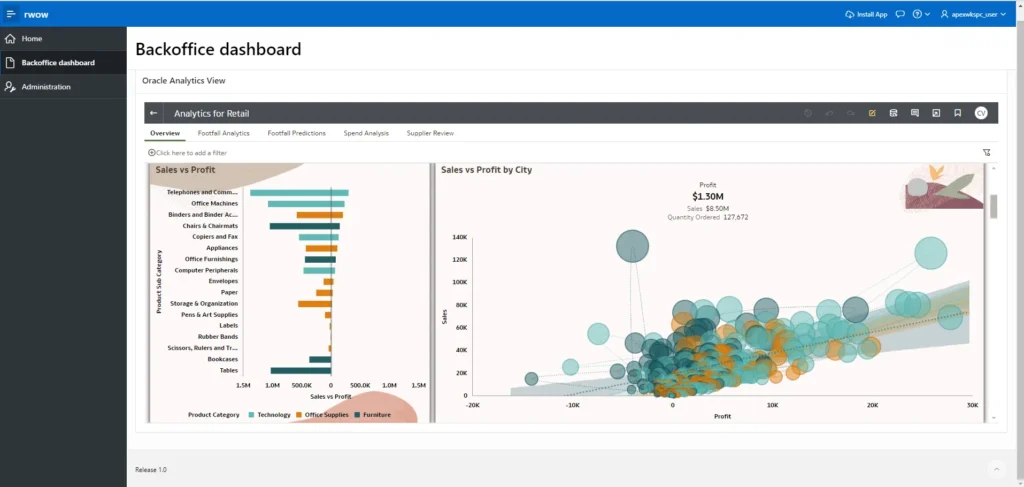
Run your application and you will have your Oracle Analytics embedded 🙂
Conclusion
Embedding Oracle Analytics Cloud content within Oracle APEX enables you to deliver rich, interactive analytics experiences seamlessly integrated into your APEX applications. By following the steps outlined in this guide, you can leverage the power of OAC to provide valuable insights to your users directly within your APEX applications. Remember to test thoroughly to ensure proper functionality and compatibility across different browsers and devices.
Happy embedding!