A common question when using Oracle Machine Learning (OML) on Autonomous Database / Autonomous AI Database is:
“What exactly do LOW, MEDIUM, and HIGH mean. And when should I use each one?”
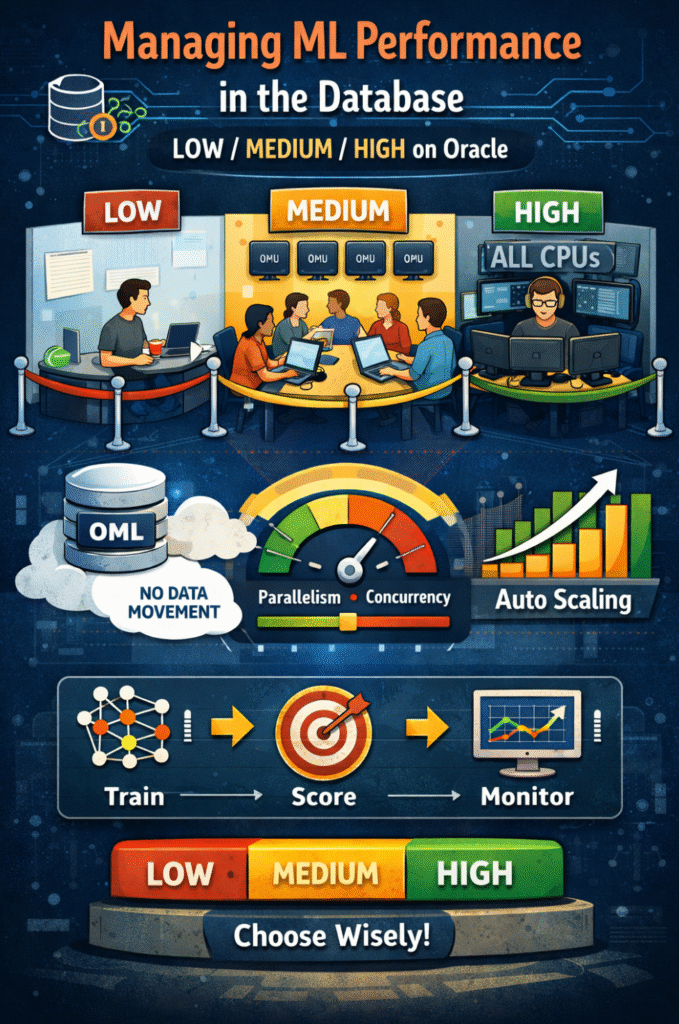
These are not informal labels. They are predefined database services (service names in your wallet / tnsnames.ora) that map to resource consumer groups. Those consumer groups control parallelism and concurrency, and they directly influence how ML training, scoring, and data-processing workloads behave under load. (See References 1, 2.)
Why this matters
OML is designed to run analytics and ML where the data already lives. That helps reduce or eliminate data movement overhead and can simplify architectures compared to moving data to an external engine for training and scoring. (See References 6, 7.)
Oracle ML Product Management summarizes that performance is dominated by factors such as data volume, data movement, algorithm choice, data complexity, implementation parallelism, concurrent users, and overall system load. (See Reference 6.)
The core concept: LOW / MEDIUM / HIGH are service levels that govern parallelism and concurrency
When you connect to an Autonomous database using one of the predefined services (for example: <dbname>_low, <dbname>_medium, <dbname>_high), the database applies a defined configuration for:
- Parallel execution behavior (whether operations run in parallel and how much parallelism is available), and
- Concurrency limits (how many SQL statements can run concurrently before additional work is queued). (See References 1, 2.)
Oracle’s documentation also clarifies that:
- Concurrency refers to the number of SQL statements that can run concurrently in a service; when the limit is reached, additional statements are queued until running work completes. (See Reference 1.)
- For services that do not use parallelism (such as
LOW), the number of sessions is bounded by the databasesessionsparameter. (See Reference 1.) - You can inspect current rules using:
SELECT * FROM CS_RESOURCE_MANAGER.LIST_CURRENT_RULES();(See References 1, 3.)
The predefined services (what Oracle documents)
Autonomous AI Database exposes these predefined services in the wallet / tnsnames.ora:
<dbname>_tpurgent<dbname>_tp<dbname>_high<dbname>_medium<dbname>_low(See Reference 1.)
They map to consumer groups TPURGENT, TP, HIGH, MEDIUM, and LOW. (See Reference 1.)
LOW
Oracle documents LOW as a service with no parallelism and indicates that non-parallel services are bounded by the database sessions parameter. (See Reference 1.)
MEDIUM
Oracle documents MEDIUM as a typical service for reporting and batch operations where operations run in parallel and are subject to queuing, and provides guidance to use it for analytic workloads such as long-running queries scanning large datasets, batch loads, and ad hoc operational queries. Oracle also notes that if default DOP/concurrency doesn’t fit your needs, you can modify the MEDIUM concurrency limit. (See Reference 1.)
Oracle provides detailed tables for the default number of concurrent statements and the documented DOP behavior by compute model (OCPU/ECPU) and scaling configuration. (See Reference 2.)
HIGH
Oracle documents HIGH as a service for reporting and batch operations where operations run in parallel and are subject to queuing, and recommends it for low-concurrency analytic workloads (for example, a reporting database accessed by only a few users simultaneously). (See Reference 1.)
Oracle provides detailed tables for the default number of concurrent statements and the documented DOP behavior by compute model (OCPU/ECPU) and scaling configuration. (See Reference 2.)
TP and TPURGENT
Oracle’s guidance explicitly distinguishes short-running transactional workloads from analytic workloads:
TP,TPURGENT, orLOW: recommended for OLTP applications or tools expected to run short-running queries and transactions. (See Reference 1.)- The same page documents the service characteristics, including that
TPURGENTsupports manual parallelism andTPdoes not run with parallelism. (See Reference 1.)
A critical operational detail: parallel DML restrictions (19c vs 26ai)
Oracle’s service documentation includes pointers to parallel DML behavior and restrictions depending on database version:
- For Oracle AI Database 26ai, it points to “About Parallel DML Operations.”
- For Oracle Database 19c, it points to “Transaction Restrictions for Parallel DML.” (See Reference 1.)
If your workload mixes DML and subsequent reads in the same session, this is relevant because parallel DML restrictions can affect what you can do without committing/rolling back, depending on version and workload pattern. (See Reference 1.)
Auto Scaling: what Oracle documents (and what it impacts)
With compute auto scaling enabled, Autonomous can use up to three times more CPU and IO resources than specified by the baseline OCPU/ECPU allocation. When workload requires additional resources, the database uses them automatically without manual intervention. (See Reference 4.)
This matters because the documented concurrency and parallelism behavior for services is described alongside whether compute auto scaling is enabled. (See Reference 2.)
Scoring performance: the principle to keep in mind
Oracle ML Product Management’s scoring guidance emphasizes that moving batch data out of the database for scoring can add overhead (data movement and loading), whereas scoring in-database avoids that movement and can reduce latency associated with loading data into a separate analytic engine. (See Reference 7.)
OML4Py Embedded Python Execution: how service level interacts with parallel execution
Oracle documents that Embedded Python Execution runs user-defined functions in Python engines spawned and controlled by Autonomous Database, and that service levels are used to manage system load by controlling available parallelism. (See Reference 8.)
For the Python API, Oracle documents:
parallel=Truecorresponds to the service level defined in the notebook interpreter.parallel=xis limited by the service level. (See Reference 8.)
For the REST API, Oracle documents that the request can specify the service level used for execution (for example, providing service:"MEDIUM" with parallelFlag:true). (See Reference 8.)
Monitoring: where Oracle says to look, and what retention means
Monitoring through Database Actions → Database Monitor, including:
- Default retention for performance data is 30 days.
- Charts show the last 8 days by default in the Time Period view.
- Retention can be changed by modifying AWR retention with
DBMS_WORKLOAD_REPOSITORY.MODIFY_SNAPSHOT_SETTINGS()(with a maximum retention of 30 days, per that page). (See Reference 5.)
Separately, Oracle Database documentation (AWR settings) states:
- Default snapshot interval is 60 minutes.
- Default AWR snapshot retention period is 8 days. (See Reference 9.)
References
- Database Service Names for Autonomous AI Database (LOW/MEDIUM/HIGH/TP/TPURGENT, definitions, guidelines, queuing, sessions bound, LIST_CURRENT_RULES, switching services)
https://docs.oracle.com/iaas/autonomous-database-serverless/doc/predefined-database-services-names.html - Service Concurrency (default concurrent statements and DOP behavior by compute model and scaling configuration)
https://docs.oracle.com/en/cloud/paas/autonomous-database/serverless/adbsb/manage-service-concurrency.html - CS_RESOURCE_MANAGER package (LIST_CURRENT_RULES and resource manager interfaces)
https://docs.oracle.com/en/cloud/paas/autonomous-database/serverless/adbsb/cs-resource-manager.html - Compute Auto Scaling (up to 3× CPU and IO resources)
https://docs.oracle.com/en-us/iaas/autonomous-database-shared/doc/autonomous-auto-scale.html - Use Database Actions to Monitor Activity and Utilization (Database Monitor retention 30 days; default 8-day view; AWR retention tie-in)
https://docs.oracle.com/en/cloud/paas/autonomous-database/serverless/adbsb/mdw-monitoring-database-actions-database-monitor.html - Machine Learning: Performance on Autonomous Database (factors impacting ML performance; model building performance discussion)
https://blogs.oracle.com/machinelearning/machine-learning-performance-on-autonomous-database - Machine Learning: Scoring Performance on Autonomous Database (batch scoring; data movement and scoring considerations)
https://blogs.oracle.com/machinelearning/machine-learning-scoring-performance-on-autonomous-database - Parallelism with OML4Py Embedded Python Execution (service level and parallel controls; Python + REST behavior)
https://docs.oracle.com/en/database/oracle/machine-learning/oml4py/1/mlpug/parallelism-service-levels.html - AWR Settings (default snapshot interval 60 minutes; default retention 8 days)
https://docs.oracle.com/en/database/oracle/oracle-database/26/tgdba/awr-settings.html
If this guide helped you, I share more practical Oracle AI & ML notes, short experiments, and customer-style learnings on my LinkedIn and on my website. Feel free to connect or subscribe to stay in the loop for future posts 🙂