As a developer working with Oracle APEX, staying updated with the latest features and enhancements is crucial for building scalable and secure applications. While tools like ChatGPT have become invaluable for coding assistance, I’ve often found that its knowledge of specific technologies can lag behind the latest updates. This is particularly true when new versions are released with critical features that I want to take advantage of in my development workflows.
Oracle APEX 24.1 introduces a range of new functionalities, including enhanced AI integration, JSON Relational Duality, and advanced data visualizations. However, when I use ChatGPT for help with these specific features, I sometimes receive information that reflects outdated versions. As a result, I’ve realized the need to fine-tune a model using the most up-to-date documentation to ensure that the AI can provide accurate, relevant responses when I’m developing.
In this article, I will walk you through my journey of fine-tuning an OpenAI model with the Oracle APEX 24.1 End User’s Guide using Data Science in Oracle Cloud Infrastructure (but you can run it locally at any code editor). The goal is to create a highly specialized AI assistant tailored to Oracle APEX development, so I can ask questions about the latest features and get up-to-date, detailed responses. If you’ve ever found yourself needing precise, version-specific coding assistance, this guide will show you how to customize your AI tools for the task.
1. Data Preparation
Fine-Tuning the Model: Structuring Oracle APEX Data for GPT-4 with Python
When preparing data for fine-tuning a language model, the data format plays a crucial role in ensuring that the model can learn effectively. OpenAI models require a specific structure that consists of prompt-response pairs, which reflect real-world interactions. This is particularly useful when fine-tuning models to address domain-specific tasks like explaining Oracle APEX concepts.
Why is This Format Necessary for Fine-Tuning?
OpenAI’s fine-tuning process relies on structured data where each interaction between the user and assistant is represented in a uniform way. The JSONL format enables this structured learning because:
- Role-based learning: The “user” role teaches the model how to interpret a prompt, while the “assistant” role guides it on how to respond.
- Consistency: This ensures that the model learns from interactions that mimic real-world usage. The model will expect a question from a user and learn to provide an appropriate response, just like a real conversation.
- Flexibility: The JSONL format is flexible, allowing us to include metadata or additional context for each interaction, which can be expanded as needed.
This structured data is crucial because it provides the necessary format for models like GPT-4 to understand domain-specific language (like Oracle APEX terminology) and generate accurate responses.
Below, I’ll explain the process of converting the Oracle APEX End User’s Guide into a fine-tuning dataset and why this format is essential.
1.1. Converting PDF to Line-by-Line data
First, we needed to extract the content from the Oracle APEX End User’s Guide, a PDF document, in a structured way. Since the data is stored in a non-text format (PDF), it is important to read it line by line so that we can accurately capture both the questions and the answers from the documentation. To achieve this, the code reads each line of the PDF and splits the content accordingly.
import PyPDF2

# Extract text from the PDF guide, line by line
def extract_text_by_line(pdf_path):
    lines = []
    with open(pdf_path, 'rb') as file:
        reader = PyPDF2.PdfReader(file)
        for page in reader.pages:
            text = page.extract_text()
            lines.extend(text.splitlines())  # Split text into lines
    return lines
This approach ensures that we capture granular details, like specific lines that contain prompts (user questions) and corresponding answers (assistant responses). By splitting the content into individual lines, we increase the likelihood of creating accurate question-answer pairs from the technical document.
1.2. Structuring data for Fine-Tuning: Prompt-Completion pairs
Once the text is extracted, we need to structure it into the JSONL (JSON Lines) format, which is required for OpenAI fine-tuning. Each line of the document is treated as either a prompt (the question) or a completion (the answer). This is where the conversational format of the fine-tuning data comes into play.
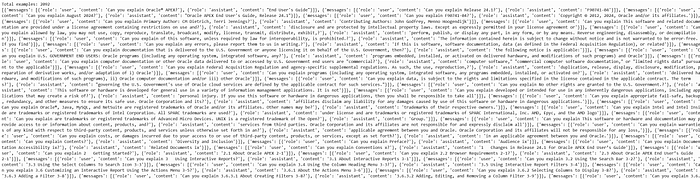
- Prompt: The first line in the pair acts as the “user” input, a question.
- Completion: The second line serves as the “assistant” response, providing an explanation or answer.
By structuring the data this way, the model can learn to answer questions about Oracle APEX based on the provided content. This ensures that the model can respond to specific user queries about the platform once fine-tuned.
1.3. Adding additional examples
To supplement the data extracted from the Oracle APEX documentation, additional predefined examples are added. This step is critical because it provides more control over the types of questions the model will learn to answer.
# Add predefined examples
additional_examples = [
    {"messages": [{"role": "user", "content": "What is Oracle APEX?"},
                  {"role": "assistant", "content": "Oracle APEX is a low-code development platform for building scalable, secure applications."}]},
    {"messages": [{"role": "user", "content": "How do I create an application in Oracle APEX?"},
                  {"role": "assistant", "content": "In Oracle APEX, you can create applications using the App Builder wizard to define pages, data sources, and navigation."}]},
    # Additional examples follow...
]
This ensures that the model has a more rounded training dataset, which reflects not only the content extracted from the documentation but also custom examples that might not be present in the text.
1.4. Saving the Data for Fine-Tuning
After structuring the data, it is saved in JSONL format, which is necessary for fine-tuning the model on OpenAI’s platform.
# Save the structured data into JSONL format
def save_as_jsonl(examples, output_file):
    with open(output_file, 'w') as f:
        for example in examples:
            json.dump(example, f)
            f.write('\n')

# Save the dataset
output_file = "apex_finetune_data_end_users_guide_by_line.jsonl"
save_as_jsonl(fine_tuning_data, output_file)
2. Data Analysis
2.1. Loading the dataset
The first step is to load the JSONL dataset that contains the extracted prompts and completions from the Oracle APEX End User Guide. Each line in the JSONL file represents a prompt-completion pair that will be used for fine-tuning the model.
with open(data_path, 'r', encoding='utf-8') as f:
    dataset = [json.loads(line) for line in f]
This script reads the JSONL file line-by-line and converts each line into a Python dictionary. Each entry in the dataset contains a set of messages, which include both user prompts and assistant responses that will serve as training examples.
2.2. Initial Dataset Statistics
Before proceeding with the fine-tuning process, we need to inspect the dataset to understand its structure and content. Specifically, we want to check how many examples we have and print out the first example to ensure that the data extraction was performed correctly.
print("Num examples:", len(dataset))
print("First example:")
for message in dataset[0]["messages"]:
    print(message)
- Num examples: This simply counts the number of prompt-completion pairs in the dataset. In this case, it shows 17 examples.
- First example: By printing the first example, we can inspect its content. However, in this particular case, the first example appears to contain legal copyright information rather than a useful prompt-response pair. This indicates that some unnecessary text may have been captured during the PDF extraction process, and this might require filtering out irrelevant sections before fine-tuning.
2.3. Format Error Checks
To ensure that the dataset adheres to the correct format required for fine-tuning, we perform several format checks. These checks help to confirm that all required fields (such as role and content) are present and that the message roles are valid (user, assistant, etc.).
format_errors = defaultdict(int)
for ex in dataset:
    if not isinstance(ex, dict):
        format_errors["data_type"] += 1
        continue

    messages = ex.get("messages", None)
    if not messages:
        format_errors["missing_messages_list"] += 1
        continue

    for message in messages:
        if "role" not in message or "content" not in message:
            format_errors["message_missing_key"] += 1

        if any(k not in ("role", "content", "name", "function_call", "weight") for k in message):
            format_errors["message_unrecognized_key"] += 1

        if message.get("role", None) not in ("system", "user", "assistant", "function"):
            format_errors["unrecognized_role"] += 1

        content = message.get("content", None)
        function_call = message.get("function_call", None)

        if (not content and not function_call) or not isinstance(content, str):
            format_errors["missing_content"] += 1

    if not any(message.get("role", None) == "assistant" for message in messages):
        format_errors["example_missing_assistant_message"] += 1

if format_errors:
    print("Found errors:")
    for k, v in format_errors.items():
        print(f"{k}: {v}")
else:
    print("No errors found")
This script performs the following checks:
- Ensures that each entry in the dataset is a dictionary.
- Checks that the required keys
roleandcontentare present. - Verifies that each message has a valid
role(e.g.,user,assistant,system). - Ensures that every prompt-completion pair has an assistant message (to complete the example).
Result: The output indicates that no errors were found, meaning the dataset is properly structured for fine-tuning.
2.4. Token counting functions
Next, we need to analyze the dataset by counting the number of tokens in each example (prompt and response) to ensure we stay within the token limits for OpenAI fine-tuning (16,385 tokens per example). For this, we use the tiktoken library, which is optimized for token counting with OpenAI models.
encoding = tiktoken.get_encoding("cl100k_base")

# Token counting function
def num_tokens_from_messages(messages, tokens_per_message=3, tokens_per_name=1):
    num_tokens = 0
    for message in messages:
        num_tokens += tokens_per_message
        for key, value in message.items():
            num_tokens += len(encoding.encode(value))
            if key == "name":
                num_tokens += tokens_per_name
    num_tokens += 3  # Bias for end of conversation
    return num_tokens
This function calculates the number of tokens in each message. Each message is assigned a bias of 3 tokens (for message overhead), and additional tokens are added based on the content. The token count is critical because exceeding OpenAI’s token limits may result in errors or truncated examples during fine-tuning.
To specifically count the tokens used by the assistant’s responses, we use the following function:
def num_assistant_tokens_from_messages(messages):
    num_tokens = 0
    for message in messages:
        if message["role"] == "assistant":
            num_tokens += len(encoding.encode(message["content"]))
    return num_tokens
2.5. distribution of messages and tokens
After counting the tokens in the dataset, we calculate and display the distribution of the number of messages and tokens in each example. This helps us identify if any examples are too long or too short.
def print_distribution(values, name):
    print(f"\n#### Distribution of {name}:")
    print(f"min / max: {min(values)}, {max(values)}")
    print(f"mean / median: {np.mean(values)}, {np.median(values)}")
    print(f"p5 / p95: {np.quantile(values, 0.05)}, {np.quantile(values, 0.95)}")
This function prints out the minimum, maximum, mean, and median values, as well as the 5th and 95th percentile values for the given token or message counts. This provides insights into whether any examples are outliers in terms of length.
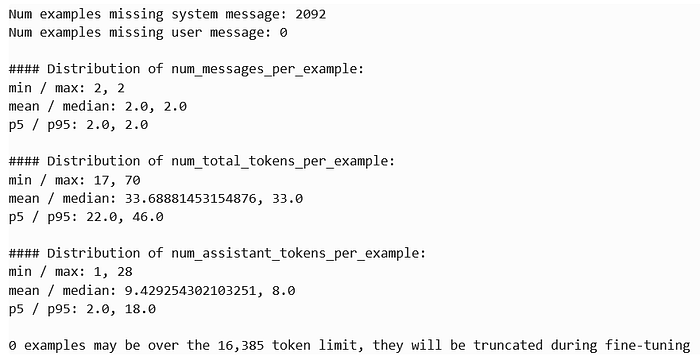
The output provides a summary of your fine-tuning dataset, showing that:
- 2092 examples are missing a system message (not critical but informative).
- 0 examples are missing a user prompt, meaning all entries have valid user input.
- Each example consistently has 2 messages (user prompt and assistant response).
- The token count per example ranges between 17 and 70 tokens, with an average of 33.69 tokens, well within the fine-tuning limit of 16,385 tokens.
- Assistant responses contain between 1 and 28 tokens, with an average of 9.42 tokens, making the dataset concise and efficient.
Overall, the dataset is well-structured, with no token truncation issues, and is ready for fine-tuning.
2.6. Pricing and default epochs estimate
Next, we estimate the pricing and default epochs for training based on the number of tokens in the dataset. OpenAI’s fine-tuning costs are based on the total number of tokens processed during training, so it’s important to calculate how many tokens we’ll be billed for.
MAX_TOKENS_PER_EXAMPLE = 16385
TARGET_EPOCHS = 3
MIN_TARGET_EXAMPLES = 100
MAX_TARGET_EXAMPLES = 25000
MIN_DEFAULT_EPOCHS = 1
MAX_DEFAULT_EPOCHS = 25

n_epochs = TARGET_EPOCHS
n_train_examples = len(dataset)
if n_train_examples * TARGET_EPOCHS < MIN_TARGET_EXAMPLES:
    n_epochs = min(MAX_DEFAULT_EPOCHS, MIN_TARGET_EXAMPLES // n_train_examples)
elif n_train_examples * TARGET_EPOCHS > MAX_TARGET_EXAMPLES:
    n_epochs = max(MIN_DEFAULT_EPOCHS, MAX_TARGET_EXAMPLES // n_train_examples)

n_billing_tokens_in_dataset = sum(min(MAX_TOKENS_PER_EXAMPLE, length) for length in convo_lens)
print(f"Dataset has ~{n_billing_tokens_in_dataset} tokens that will be charged for during training")
print(f"By default, you'll train for {n_epochs} epochs on this dataset")
print(f"By default, you'll be charged for ~{n_epochs * n_billing_tokens_in_dataset} tokens")

In this calculation:
- Default training epochs: It calculates that we would train for 5 epochs.
- Billing tokens: The dataset contains approximately 70,477 tokens, meaning we’d be billed for around 211,431 tokens during fine-tuning.
3. Fine-Tuning the OpenAI Model
Once the data is ready and analyzed, let’s proceed with the fine-tuning process. This is done using the OpenAI API in a Data Science notebook running on Oracle Cloud Infrastructure (OCI). OCI provides a seamless environment for running Python-based machine learning workloads, making it an ideal platform for fine-tuning large models like GPT-4.
The fine-tuning process starts by uploading the prepared dataset to OpenAI:
from openai import OpenAI

# Initialize OpenAI client
client = OpenAI(api_key='your-api-key')  # Replace with your actual API key

# Upload your fine-tune dataset
response = client.files.create(
    file=open("apex_finetune_data_end_users_guide_by_line.jsonl", "rb"),
    purpose="fine-tune"
)

# Check the response to confirm the file upload
print(response)
- Initialize the client: Connect to OpenAI using your API key.
- Upload the dataset: The file
"apex_finetune_data_end_users_guide_by_line.jsonl"is uploaded, specifying its purpose as “fine-tune.” - Confirm upload: The response confirms the file upload and provides the file ID for the next step in fine-tuning.
Let’s go no with the initialization of the fine-tuning job using OpenAI’s Python API.
# Retrieve file ID from the response
file_id = response.id
print(file_id)

# Step 2: Start the fine-tuning job
fine_tune_job = client.fine_tuning.jobs.create(
    training_file=file_id,  # Use the uploaded file ID
    model="gpt-4o-2024-08-06",  # Use a valid model for fine-tuning
    hyperparameters={
        "batch_size": 8,  # Start with a batch size of 8 for a medium dataset
        "learning_rate_multiplier": 0.05,  # Slightly lower learning rate to prevent overwriting base model knowledge
        "n_epochs": 4  # 4 epochs to start with, monitor the results and adjust if necessary
    },
    suffix="apex-tuned-model-08-10-changed-parameters"
)
# Check the response to monitor the job
print(fine_tune_job)
After uploading your training data (apex_finetune_data_end_users_guide_by_line.jsonl), this line retrieves and prints the file ID. This ID is necessary for subsequent steps, particularly when starting the fine-tuning job.
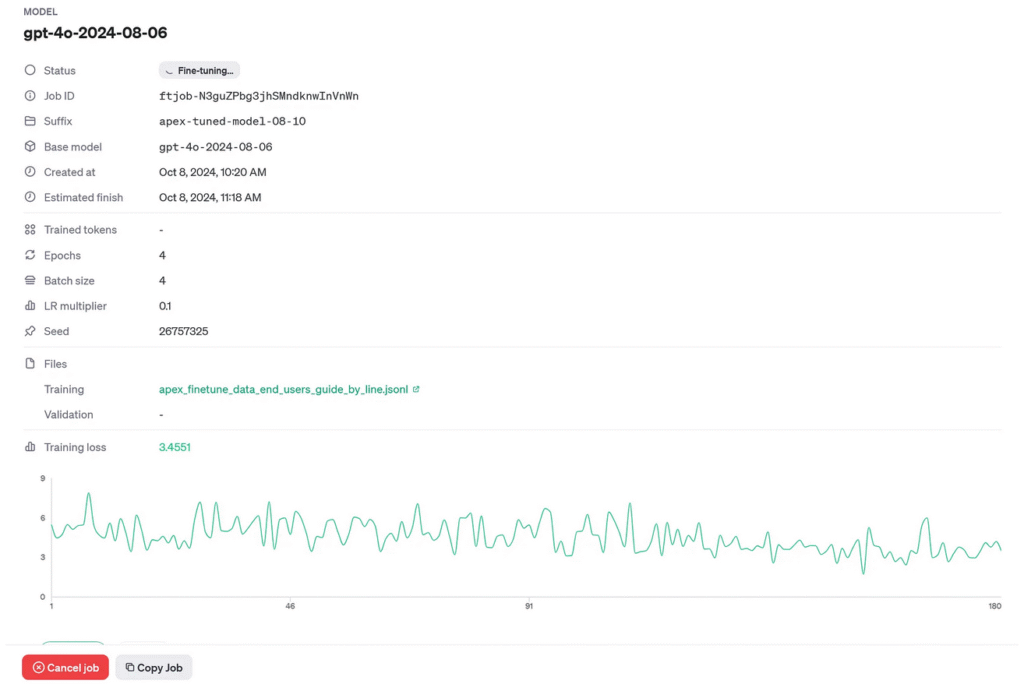
Here, you use the file_id retrieved earlier and specify the base model (gpt-4o-2024-08-06). The hyperparameters like batch_size, learning_rate_multiplier, and n_epochs control the fine-tuning process:
- Batch Size (8): This determines how many examples the model processes before updating the weights. For a medium-sized dataset, 8 is a balanced choice.
- Learning Rate Multiplier (0.05): A low value like 0.05 prevents the model from overriding its existing knowledge too quickly.
- Epochs (4): The number of times the model will go through the entire dataset. 4 epochs are used here to avoid overfitting.
Monitoring the Fine-Tuning job.
# Check the response to monitor the job
print(fine_tune_job)
This part prints out the details of the fine-tuning job, including the job ID, model used, and hyperparameters. It helps track the status of your job and ensures it’s running with the desired settings.

You can also monitor the fine-tuning job via OpenAI’s dashboard. Once the job is created, you can access the dashboard at the provided URL in the job’s response or through OpenAI’s fine-tuning section.
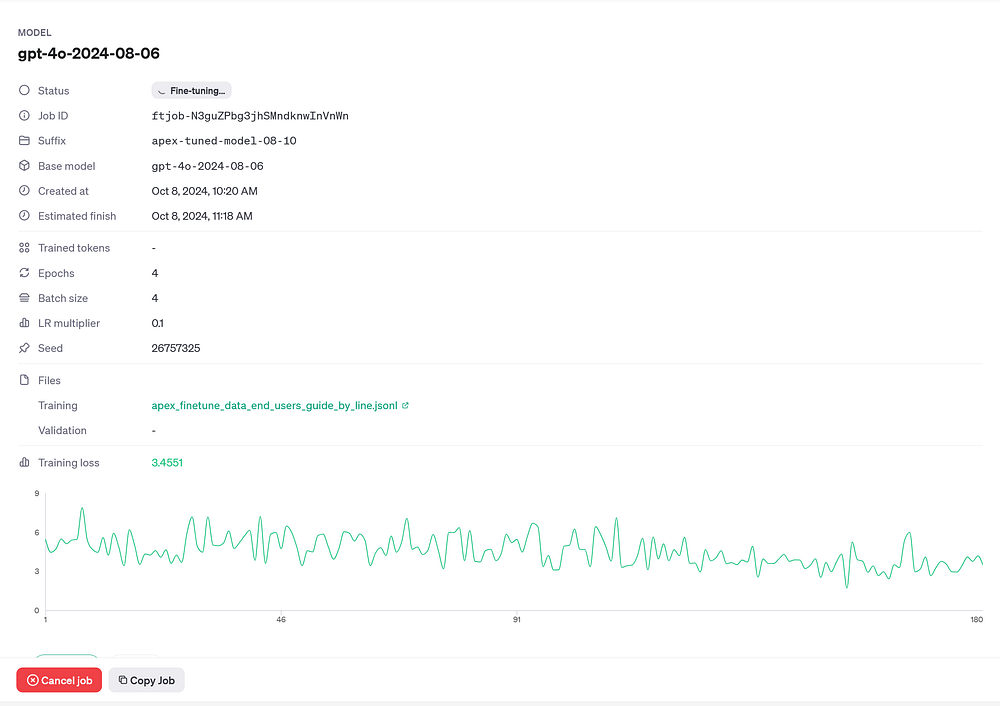
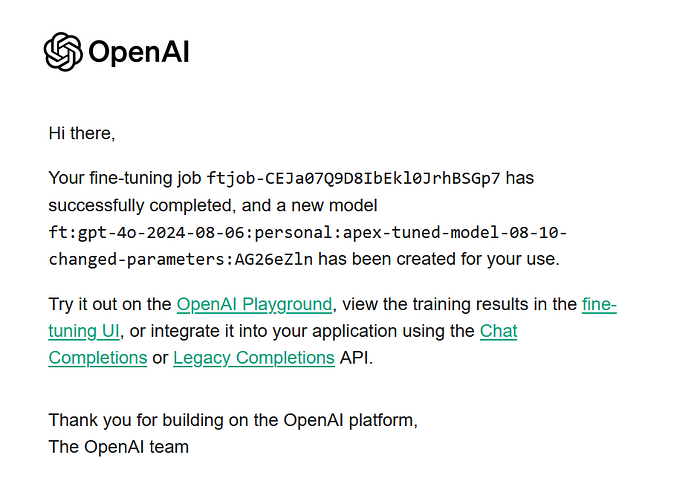
OpenAI also sends email notifications for key events such as job completion or failure. This keeps you updated without needing to constantly monitor the dashboard.
4. Model testing
Once the fine-tuning is complete, it’s time for testing the fine-tuned model by passing it prompts related to Oracle APEX. This include both general questions and highly specific topics such as JSON Relational Duality, a feature introduced in APEX 24.1.
import openai

# Call the fine-tuned model with a specific prompt
def call_finetuned_model(prompt):
    response = openai.chat.completions.create(
      model="ft:personal:apex-tuned-model",  # Fine-tuned model ID
      messages=[
        {"role": "system", "content": "You are an Oracle APEX assistant."},
        {"role": "user", "content": prompt}
      ]
    )
    return response.choices[0].message.content

# Example usage
response = call_finetuned_model("Can you explain JSON Relational Duality in Oracle APEX?")
print(response)
Results:
“Certainly! JSON Relational Duality is a feature in Oracle that allows seamless integration and transformation between JSON and relational data structures. This is particularly handy in Oracle APEX when dealing with applications that need to consume or produce JSON data while using relational databases…”
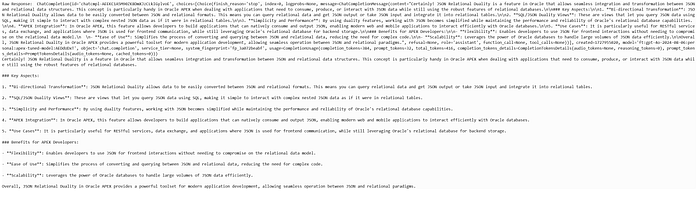
The model successfully generated an accurate and detailed response explaining JSON Relational Duality, showcasing its ability to handle complex, version-specific queries about Oracle APEX.
Conclusions & Next Steps
This process of fine-tuning an OpenAI model with the Oracle APEX 24.1 End User’s Guide demonstrates how powerful AI can become when tailored for specific use cases. By fine-tuning the model, we’ve created a specialized assistant capable of answering complex, up-to-date questions about Oracle APEX. However, this is just the beginning.
Next Steps:
- This approach can be further refined by incorporating additional data types, such as developer guides, API references, and even forum Q&A data, making the assistant even more versatile and reliable.
- Coming soon, we will be integrating this fine-tuned model into an Oracle APEX application, where it will serve as a dedicated AI assistant for answering the latest and most complex questions about APEX development.
While this article covered the data science part and Python code needed for fine-tuning the model, the next phase is the API integration — the fun part where this assistant can be embedded directly into APEX applications.
I encourage you to stay tuned for more updates as we move closer to delivering this enhanced assistant experience in APEX! It’s going to revolutionize how developers interact with Oracle APEX by providing real-time, version-specific answers right inside their development environment.
You can find me, as always, on LinkedIn 😀
Exciting times are ahead!